Lennox Product Registration
Registering your new Lennox heating or cooling system is a crucial step. It unlocks valuable benefits like warranty coverage and access to exclusive deals. However, homeowners often encounter difficulties during the registration process. This guide provides practical troubleshooting steps to resolve common Lennox product registration issues.
Why Register Your Lennox Product?
Before diving into troubleshooting, let's quickly recap the importance of registering your Lennox system:
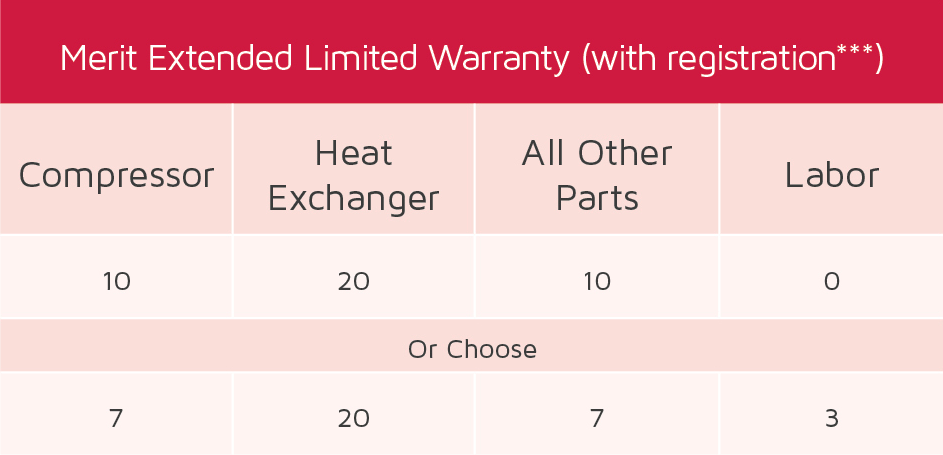
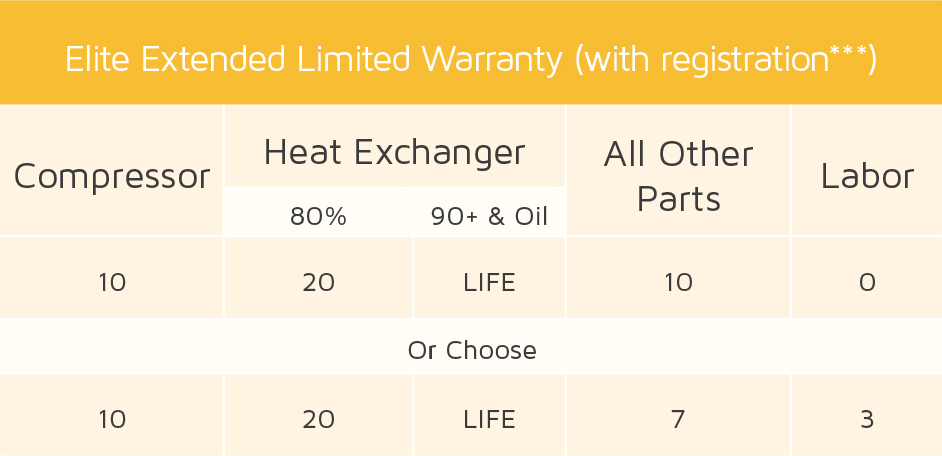
- Warranty Coverage: Registration activates your product's warranty, protecting you from unexpected repair costs.
- Product Updates: Lennox can notify you about important product updates and safety recalls.
- Proof of Ownership: Registration serves as proof of ownership should you need to file a warranty claim or require service.
- Access to Exclusive Offers: Registered owners may receive exclusive promotions and discounts on Lennox products and services.
Common Lennox Product Registration Problems
Several issues can prevent you from successfully registering your Lennox product. These include:
- Incorrect Model or Serial Number: Entering the wrong information is a frequent error.
- Website Errors: Technical glitches on the Lennox registration website can sometimes occur.
- Missing Information: Failing to provide all required details can prevent registration completion.
- Dealer Registration Issues: In some cases, the dealer is responsible for registration, and delays or errors can occur on their end.
- Internet Connectivity Problems: A weak or unstable internet connection can interrupt the registration process.
Troubleshooting Lennox Product Registration: A Step-by-Step Guide
Follow these steps to diagnose and resolve common Lennox product registration problems. We'll start with the simplest checks and gradually move towards more technical solutions.
Step 1: Double-Check the Basics (No Tools Required)
This initial step focuses on verifying the accuracy of the information you're entering. It requires no tools and is the easiest place to start.
- Locate the Model and Serial Number: These are usually found on a sticker attached to the unit. For outdoor units, look on the side or back. For indoor units (furnaces or air handlers), check inside the cabinet door. Refer to your Lennox product documentation for specific location details.
- Verify Accuracy: Carefully compare the model and serial number you've entered on the registration form with the numbers on the unit's sticker. Pay close attention to zeros (0) versus the letter "O", and ones (1) versus the letter "I". Even a single incorrect digit can cause the registration to fail.
- Check Your Internet Connection: Ensure you have a stable internet connection. Try loading a different website to confirm. A weak signal can interrupt the registration process.
- Confirm Required Information: Make sure you've filled out all required fields on the registration form. Look for fields marked with an asterisk (*) or labeled as mandatory. Common required fields include your name, address, phone number, email address, purchase date, and dealer information.
Step 2: Website Troubleshooting (No Tools Required)
If the basic information is correct, the problem might lie with the Lennox registration website itself.
- Try a Different Browser: Sometimes, a specific browser might have compatibility issues with the website. Try using a different browser (e.g., Chrome, Firefox, Safari, Edge) to see if that resolves the problem.
- Clear Your Browser's Cache and Cookies: Stored cache and cookies can sometimes interfere with website functionality. Clearing them can often fix registration problems. Refer to your browser's help documentation for instructions on how to clear cache and cookies.
- Disable Browser Extensions: Certain browser extensions (e.g., ad blockers, privacy extensions) can sometimes interfere with website functionality. Try disabling these extensions temporarily and then attempting to register your product again.
- Check for Website Maintenance: Occasionally, websites undergo scheduled maintenance, which can temporarily prevent registration. Check the Lennox website or social media channels for any announcements regarding maintenance periods. Try again later if maintenance is underway.
Step 3: Contact Your Lennox Dealer (No Tools Required)
If you've tried the previous steps and are still unable to register your product, contact your Lennox dealer. They may be able to assist you with the registration process or provide additional information.
- Dealer Registration: Some dealers handle the registration process on behalf of their customers. Inquire whether your dealer has already registered your product or if they can do so for you.
- Incorrect Information: The dealer may have provided you with incorrect model or serial number information. Ask them to verify the information they have on file.
- Technical Assistance: Your dealer may have experience troubleshooting common registration issues and can provide valuable guidance.
Step 4: Contact Lennox Customer Support (No Tools Required)
If you've exhausted all other options, contact Lennox customer support for assistance.
- Locate Contact Information: Find the Lennox customer support contact information on the Lennox website (usually under "Contact Us" or "Support").
- Prepare Information: Before contacting customer support, gather the following information:
- Your model and serial number
- Purchase date
- Dealer information
- A detailed description of the problem you're encountering
- Be Patient and Courteous: Remember that customer support representatives are there to help you. Be patient and courteous when explaining your issue.
Step 5: Advanced Troubleshooting (Requires Caution and May Need Professional Help)
The following steps involve accessing your Lennox system and potentially require basic tools. Proceed with caution and only if you are comfortable working with electrical equipment. If you are unsure, contact a qualified HVAC technician.
- Verifying Wiring Connections (Requires Basic Electrical Knowledge & Multimeter):
Warning: Working with electrical components can be dangerous. Turn off the power to your unit at the breaker box before attempting any wiring checks. If you are not comfortable working with electricity, contact a qualified HVAC technician.
Why to Check: Occasionally, incorrect wiring during installation can prevent the system from communicating correctly and may impact product registration (though this is less common for registration issues directly). However, it’s worth a check if all else fails.
How to Check:
- Turn off Power: Locate the circuit breaker that controls your Lennox system and turn it off. Double-check that the power is off using a non-contact voltage tester.
- Access the Control Panel: Locate the control panel on your indoor unit (furnace or air handler). This is usually behind a removable panel. Refer to your unit's manual for specific instructions.
- Inspect Wiring: Carefully inspect the wiring connections inside the control panel. Look for loose wires, corroded connections, or damaged insulation. Compare the wiring to the wiring diagram provided in your unit's manual.
- Test Voltage: Use a multimeter to check the voltage at various points in the control panel. Refer to your unit's manual for the correct voltage readings. If you are not familiar with using a multimeter, do not attempt this step. Contact a qualified HVAC technician.
- Reconnect Power: Once you have inspected the wiring and made any necessary corrections, carefully replace the control panel cover and turn the power back on at the breaker box.
- Retry Registration: Attempt to register your Lennox product again.
When to Call a Pro: If you find any loose wires, damaged components, or incorrect voltage readings, contact a qualified HVAC technician to repair the wiring. Do not attempt to repair electrical components yourself.
- Checking the Control Board (Requires Basic Technical Knowledge and Visual Inspection):
Warning: Even with the power off, the control board may contain capacitors that can store an electrical charge. Discharge capacitors before handling the board. If you are not comfortable with this, contact a qualified HVAC technician.
Why to Check: A faulty control board can sometimes prevent proper communication and may indirectly impact product registration if the system cannot verify itself correctly. This is a less likely scenario for registration issues.
How to Check:
- Turn off Power: Ensure the power to the unit is off at the breaker.
- Access the Control Board: This is usually located inside the indoor unit, behind a control panel.
- Visual Inspection: Look for any signs of damage on the control board, such as burnt components, cracked traces, or bulging capacitors.
- Clean the Board (Carefully): Use a soft brush to gently remove any dust or debris from the control board.
- Reseat Connectors: Carefully reseat all connectors on the control board to ensure they are making good contact.
- Restore Power and Retry: Turn the power back on and attempt to register the product again.
When to Call a Pro: If you see any signs of damage on the control board, or if reseating the connectors does not resolve the problem, the board may need to be replaced by a qualified HVAC technician.
When to Call a Professional HVAC Technician
While many registration issues can be resolved with the steps outlined above, certain situations require the expertise of a qualified HVAC technician.
- Electrical Issues: If you suspect any electrical problems with your Lennox system, do not attempt to repair them yourself. Contact a qualified HVAC technician to diagnose and repair the issue safely.
- Control Board Problems: If you suspect a faulty control board, it's best to have it inspected and replaced by a professional.
- Complex System Issues: If you've tried all the troubleshooting steps and are still unable to register your product, it's possible that there is a more complex issue with your system that requires professional diagnosis and repair.
Prevention Tips for Smooth Registration
Here are some tips to help prevent registration problems in the first place:
- Keep Accurate Records: Keep a copy of your purchase receipt, warranty information, and product documentation in a safe place.
- Register Promptly: Register your product as soon as possible after purchase to ensure timely activation of your warranty.
- Double-Check Information: Carefully double-check all information before submitting the registration form.
- Ask for Assistance: Don't hesitate to ask your dealer or Lennox customer support for assistance if you encounter any problems during the registration process.
By following these troubleshooting steps and prevention tips, you can increase your chances of successfully registering your Lennox product and enjoying the full benefits of your warranty and ownership.