Carrier Model Number Search
One of the most frustrating situations for a homeowner is needing to repair or replace a part on their Carrier HVAC system, only to realize you can't find the model number. This information is crucial for ordering the correct parts, accessing technical documentation, and even getting accurate troubleshooting advice from HVAC professionals. Without it, you're essentially trying to fix a puzzle with half the pieces missing.
Why You Need the Model Number
Before we dive into the search, let's reinforce why finding the model number is so important:
- Ordering Correct Parts: Parts vary widely between models, even within the same brand. The model number ensures you get the exact replacement needed.
- Accessing Documentation: Online manuals, wiring diagrams, and troubleshooting guides are specific to model numbers.
- Accurate Professional Help: An HVAC technician will almost always ask for the model number to diagnose issues correctly and quickly.
- Warranty Claims: If your unit is under warranty, the model number is essential for filing a claim.
Step-by-Step Guide to Finding Your Carrier Model Number
Let's walk through the common locations where you can find the model number on your Carrier HVAC system. We'll start with the easiest and most likely spots and then move on to the less obvious ones.
1. Look on the Outdoor Unit (Condenser)
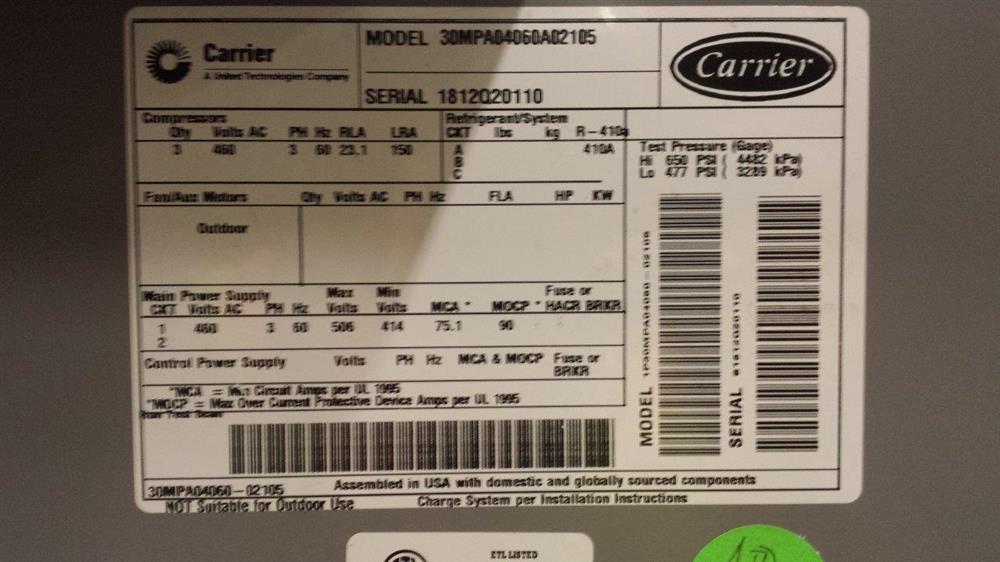
This is usually the first place to check for the model number. Most Carrier outdoor units have a rating plate or sticker attached to the exterior. This plate contains vital information, including the model number, serial number, and manufacturing date.
What to do:
- Visually Inspect: Walk around the entire outdoor unit. Look for a metallic or plastic plate, often silver, black, or white. It might be on the front, side, or back of the unit.
- Check Hidden Areas: Sometimes, the plate is tucked away in a less obvious location, such as underneath an access panel or on the back side facing the house.
- Clean the Plate: Over time, dirt and debris can obscure the information. Gently wipe the plate clean with a damp cloth to improve visibility. Avoid using harsh chemicals or abrasive cleaners, which could damage the label.
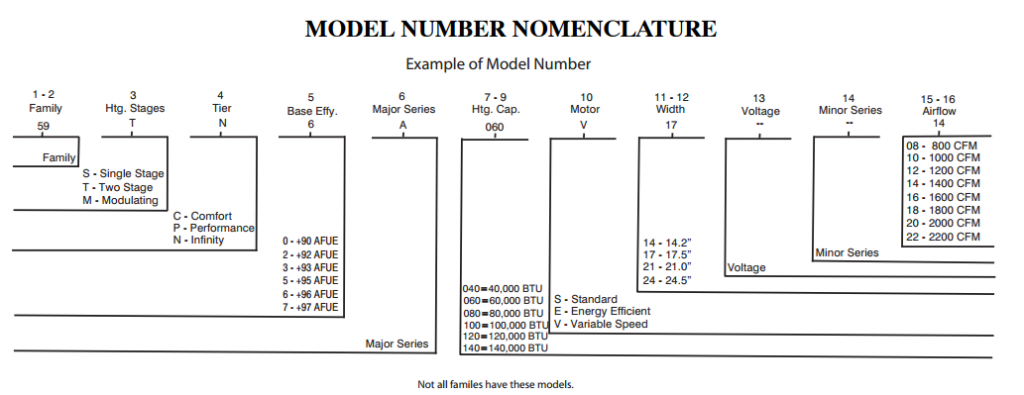
- Identify the Model Number: The model number is usually a series of letters and numbers, often located near the word "Model" or "Model Number." Common formats include something like "24ACC636A300," "38MAR124-3," or "58PAV070-12114." It's important to note the entire number, including any hyphens or letters.
If you find it: Great! Write it down or take a picture. You'll need this information later. Move on to verifying the model number on the indoor unit if possible.
If you don't find it: Don't worry, let's move on to the indoor unit.
2. Check the Indoor Unit (Furnace or Air Handler)
If you couldn't find the model number on the outdoor unit, the next place to look is on the indoor unit. This could be a furnace (if you have gas heat), an air handler (if you have an electric heat pump), or a fan coil unit.
What to do:
- Locate the Unit: The indoor unit is typically located in your basement, attic, crawl space, or utility closet.
- Inspect the Exterior: Look for a rating plate or sticker similar to the one on the outdoor unit. Check all sides of the unit.
- Check Inside Access Panels: Many indoor units have access panels that can be removed. Turn off the power to the unit at the breaker before removing any panels for safety. The rating plate might be located inside one of these panels.
- Clean the Plate: As before, clean the plate gently with a damp cloth if needed.
- Identify the Model Number: Look for the "Model" or "Model Number" designation and record the entire number.
Important Safety Note: Always turn off the power to the unit at the breaker before removing any access panels. If you are uncomfortable working with electrical components, do not proceed and consult a qualified HVAC technician.
If you find it: Excellent! Record the model number. Ideally, you'll have both the indoor and outdoor model numbers. They often correspond to each other.
If you still can't find it: Let's move on to some less common locations.
3. Check Your Thermostat
While less common, some newer Carrier thermostats can display the model numbers of the connected HVAC equipment. This is especially true for smart thermostats that are designed to communicate with the system.
What to do:
- Access the Menu: Consult your thermostat's user manual for instructions on how to access the settings menu.
- Look for System Information: Navigate through the menu options. Look for something labeled "System Info," "Equipment Info," or similar.
- Check for Model Numbers: If the thermostat displays equipment information, the model numbers for the indoor and outdoor units might be listed.
If you find it: Fantastic! Record the model numbers displayed on the thermostat.
If you don't find it: No problem, let's explore some other possibilities.
4. Review Your Homeowner's Paperwork
Dig through your home's paperwork, especially documents related to the HVAC system. This includes:
- Installation Receipts: The original installation receipt should list the model numbers of all installed equipment.
- Warranty Information: Your warranty documents will definitely include the model numbers.
- Service Records: Past service records from HVAC technicians should also include the model numbers.
- Home Inspection Report: If you recently purchased your home, the home inspection report might include the HVAC system's model numbers.
What to do:
- Gather Your Documents: Collect all relevant paperwork related to your HVAC system.
- Search for Model Numbers: Carefully review each document, looking for the model number designation.
If you find it: Great job! This is valuable information. Keep these documents organized for future reference.
If you still haven't found it: We have a few more options to try.
5. Contact the Previous Homeowner (If Applicable)
If you recently purchased your home, consider contacting the previous homeowner (or their realtor) and asking if they have any records related to the HVAC system, including the model numbers.
What to do:
- Reach Out: Contact the previous homeowner (or their realtor) in a polite and respectful manner.
- Explain Your Situation: Explain that you are trying to locate the model numbers for the HVAC system and ask if they have any records that might be helpful.
If they can provide the model numbers: Excellent! You've successfully located the information you need.
If they don't have the information: Unfortunately, this option didn't work out. Let's move on to the last resort.
6. Contact a Qualified HVAC Technician
If you've exhausted all other options and still cannot find the model number, it's time to call in a professional. A qualified HVAC technician has the expertise and tools to identify the model number, even if the rating plate is missing or damaged.
Why this is the last resort: Calling a technician will incur a service fee, but it's often the only way to get the information you need if all other attempts have failed. Furthermore, if your unit is quite old or heavily corroded, there might be safety concerns best handled by a trained professional.
What to do:
- Find a Reputable Technician: Research and select a reputable HVAC technician in your area. Look for companies with good reviews and a solid reputation.
- Schedule an Appointment: Explain to the technician that you need help identifying the model number of your Carrier HVAC system.
- Be Prepared to Provide Information: Be ready to provide the technician with any information you do have about the system, such as the age of the house, any past service records, or any other relevant details.
What the Technician Will Do:
- Inspect the Equipment: The technician will thoroughly inspect the indoor and outdoor units, looking for any remaining traces of the rating plate or other identifying marks.
- Use Specialized Tools: They may use specialized tools or techniques to identify the system components and narrow down the possible model numbers.
- Consult Technical Resources: Technicians have access to technical resources and databases that can help them identify the model number based on the system's characteristics.
When to Call a Professional: A Recap
While this guide provides a comprehensive DIY approach, there are specific situations where professional help is absolutely necessary:
- You are uncomfortable working with electrical components. Safety is paramount. Never attempt to remove access panels or work on electrical components if you are not comfortable doing so.
- The rating plate is missing or severely damaged. If the rating plate is unreadable, a technician's expertise is required.
- You suspect there may be a more serious problem with the HVAC system. If you notice any unusual noises, smells, or performance issues, it's best to consult a professional.
- You have tried all the DIY steps and still cannot find the model number. At this point, further attempts on your own are unlikely to be successful.
Final Thoughts
Finding your Carrier HVAC system's model number can be a frustrating task, but with a methodical approach and a little patience, you can often locate the information you need. Remember to prioritize safety and don't hesitate to call a professional if you encounter any difficulties or feel uncomfortable with any of the steps. Having the model number readily available will save you time, money, and frustration in the long run, whether you're ordering parts, accessing documentation, or seeking professional assistance.