Carrier Warranty Lookup By Serial Number

Frequently Asked Questions: Carrier Warranty Lookup by Serial Number
Understanding the warranty coverage for your Carrier heating and cooling equipment is crucial for protecting your investment and ensuring your home comfort. This FAQ addresses common questions about Carrier warranty lookup using the serial number.
1. Why is a Carrier Warranty Lookup Important?
A warranty lookup is essential for several reasons:
- Confirming Coverage: It verifies whether your Carrier equipment is still under warranty.
- Understanding Terms: It allows you to understand the specific coverage details, including what is covered and what isn't.
- Avoiding Unexpected Costs: Knowing your warranty status helps you avoid paying for repairs that might be covered.
- Facilitating Repairs: Having warranty information readily available streamlines the repair process when contacting a qualified technician.
- Increased Home Value: When selling a home, transferable warranties can increase its value and appeal.
Essentially, it's about peace of mind and protecting your investment in your Carrier HVAC system.
2. Where Can I Find the Serial Number on My Carrier Unit?
Locating the serial number is the first step to performing a warranty lookup. Here's where to look:
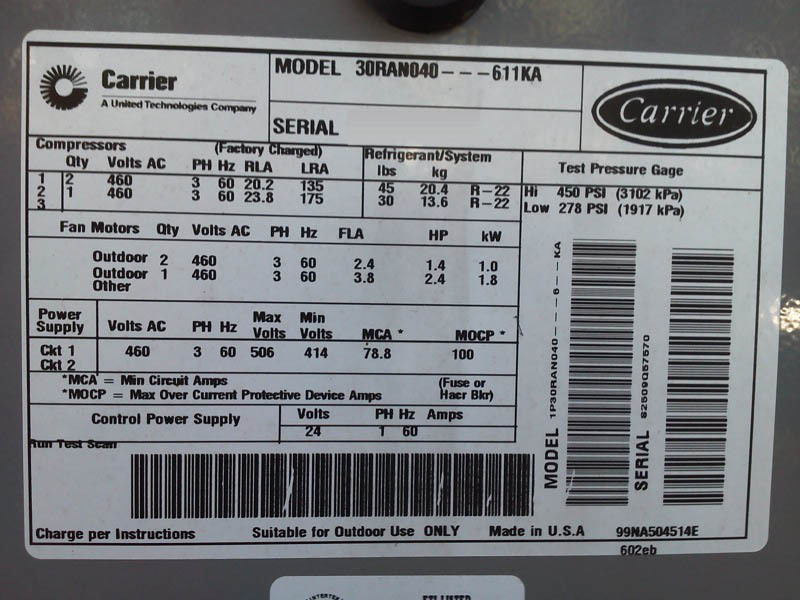
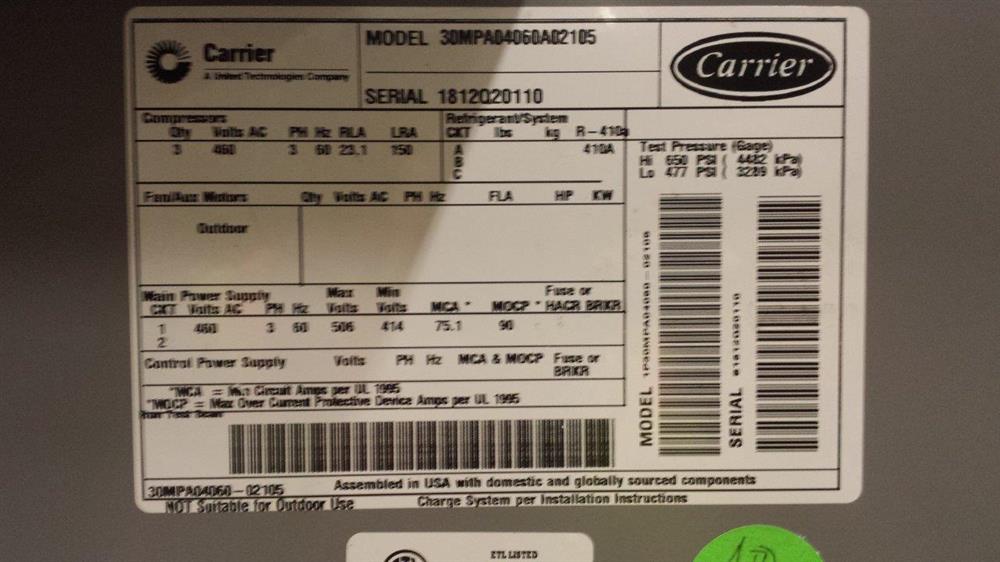
- Outdoor Unit (Condenser or Heat Pump): The serial number is typically found on a nameplate or sticker attached to the exterior of the unit. Look for a metallic or plastic plate near the access panel.
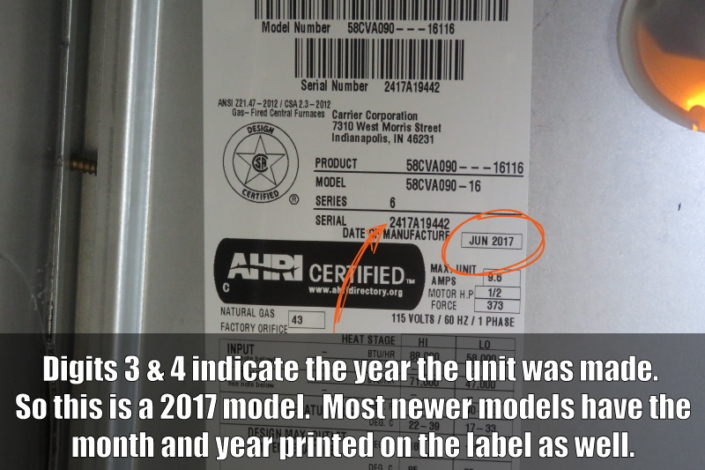
- Indoor Unit (Furnace or Air Handler): The serial number is usually located inside the unit, often on the blower housing or near the control board. You may need to remove an access panel (after disconnecting power for safety) to locate it.
- Packaging (If Available): If you have the original packaging from the unit, the serial number will also be printed on the box.
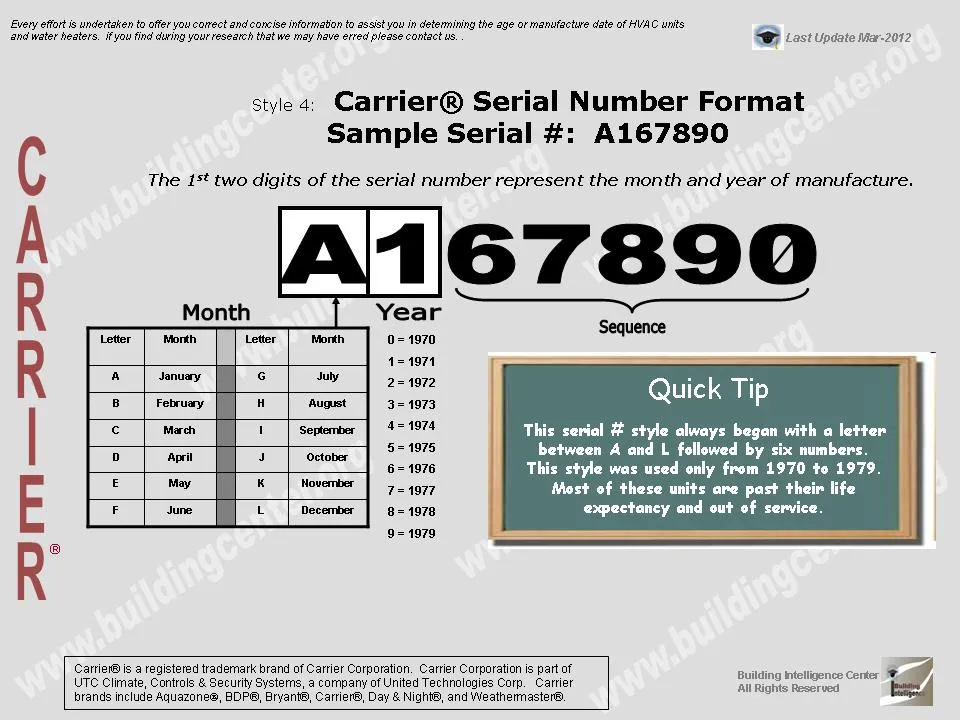
The serial number is usually a string of numbers and letters. Take a picture or write it down carefully to ensure accuracy when performing the lookup.
3. How Do I Perform a Carrier Warranty Lookup Using the Serial Number?
There are a few methods to perform a Carrier warranty lookup:
- Carrier's Website: The most direct method is to use the official Carrier website. Look for a "Warranty" or "Warranty Lookup" section. You'll typically need to create an account or provide some information like your address and the unit's serial number.
- Through Your Installing Dealer: Your installing dealer often retains records of your equipment and can assist with warranty lookup. They can quickly check the warranty status using the serial number and their dealer portal. This is often the *easiest and most reliable* method.
- Contacting Carrier Directly: You can call Carrier's customer service line and provide them with the serial number. Be prepared to answer questions about the unit's installation date and your contact information. Find the number on the official Carrier website.
Always use official channels to ensure the accuracy and validity of the warranty information.
4. What Information Do I Need for the Warranty Lookup?
You'll typically need the following information:
- Serial Number: This is absolutely essential. Double-check that you've transcribed it correctly.
- Model Number: While the serial number is primary, providing the model number can help narrow down the search and ensure accuracy.
- Installation Date: The installation date is crucial for determining the start date of the warranty. Have your installation paperwork handy. An estimate can be provided if the exact date is unavailable.
- Your Contact Information: You'll likely need to provide your name, address, phone number, and email address for verification purposes.
- Installing Dealer Information: Knowing who installed the system will streamline the process.
Having this information readily available will make the warranty lookup process faster and more efficient.
5. What Does the Carrier Warranty Typically Cover?
Carrier warranties typically cover defects in materials and workmanship under normal use and maintenance. Coverage generally includes:
- Parts: Most Carrier warranties cover replacement parts that fail due to manufacturing defects during the warranty period. Coverage length varies depending on the specific unit and warranty terms.
- Compressor: The compressor is a critical component in air conditioners and heat pumps, and it often has a longer warranty period than other parts.
- Heat Exchanger: Found in furnaces, the heat exchanger is also a vital component and can have extended warranty coverage.
It's important to understand what is *not* covered. Common exclusions include:
- Labor Costs: Many base warranties only cover parts, not the labor costs associated with replacing them.
- Damage Due to Improper Installation: If the unit was not installed correctly, the warranty may be voided.
- Damage Due to Lack of Maintenance: Regular maintenance is crucial for maintaining warranty coverage. Neglecting maintenance can lead to denied claims.
- Damage Due to External Factors: Damage caused by floods, fires, power surges, or other external factors is usually not covered.
- Normal Wear and Tear: Components that wear out over time due to normal use are generally not covered.
Always read the warranty document carefully to understand the specific terms and conditions.
6. What are the Different Types of Carrier Warranties?
Carrier offers different types of warranties with varying levels of coverage:
- Base Limited Warranty: This is the standard warranty that comes with most Carrier units. It typically covers parts for a specific period (e.g., 5 or 10 years). Labor is often *not* included.
- Registered Limited Warranty: In many jurisdictions, registering your Carrier product within a specific timeframe (often 60-90 days after installation) extends the base warranty coverage. This can significantly increase the parts warranty duration and may even include compressor coverage. Registration is usually done online or by mail. Registration is critical to obtain the best available warranty.
- Extended Warranty (Optional): Carrier also offers extended warranty plans that provide more comprehensive coverage beyond the standard warranty period. These plans often cover labor costs and may include additional benefits like preventative maintenance. These warranties are paid for, typically by the homeowner.
The specific terms and conditions of each warranty type vary. Consult the warranty documentation or contact your dealer for details.
7. What if My Carrier Unit is Not Under Warranty?
If your Carrier unit is no longer under warranty, you'll be responsible for the full cost of repairs. Here are your options:
- Pay for Repairs Out-of-Pocket: You can hire a qualified HVAC technician to diagnose and repair the problem. Be sure to get multiple quotes to ensure you're getting a fair price.
- Consider an Extended Warranty (If Available): Even if your original warranty has expired, some third-party warranty providers may offer coverage for older units. Research these options carefully, as coverage and reliability can vary.
- Evaluate Replacement vs. Repair: If the unit is old or the repairs are extensive, it may be more cost-effective to replace the entire system. New units are more energy-efficient and come with a new warranty.
Regular maintenance can help extend the lifespan of your Carrier equipment and prevent costly repairs, regardless of warranty status. Having a preventative maintenance plan in place is a *good idea*.
8. Can I Transfer the Carrier Warranty if I Sell My Home?
The transferability of a Carrier warranty depends on the specific terms of the warranty. Some warranties are transferable to the new homeowner, while others are not.
- Check the Warranty Document: The warranty document will clearly state whether the warranty is transferable and any conditions that apply.
- Contact Carrier: Contact Carrier's customer service or your installing dealer to confirm the transferability of the warranty and the necessary steps to complete the transfer. Typically, there is a form to fill out with the new owner's information.
A transferable warranty can be a significant selling point when selling your home. Make sure to provide the new homeowner with all warranty documentation.
9. How Can I Maintain My Carrier Warranty Coverage?
Maintaining your Carrier warranty coverage requires following these key steps:
- Register Your Unit: Register your unit within the specified timeframe to activate the full warranty benefits.
- Schedule Regular Maintenance: Follow the manufacturer's recommendations for regular maintenance, including filter changes, coil cleaning, and system inspections. Keep records of all maintenance performed.
- Use Qualified Technicians: Use qualified and licensed HVAC technicians for all repairs and maintenance. Improper repairs can void the warranty.
- Keep Records: Keep all documentation related to your Carrier equipment, including the warranty document, installation paperwork, and maintenance records.
- Avoid Unauthorized Modifications: Do not make any unauthorized modifications to the unit, as this can void the warranty.
By following these guidelines, you can ensure that your Carrier warranty remains valid and provides the protection you need.
10. What if I Have Trouble with the Carrier Warranty Lookup Process?
If you encounter difficulties during the warranty lookup process, consider these options:
- Double-Check the Serial Number: Ensure the serial number is entered exactly as it appears on the unit. Even a single incorrect digit can prevent the lookup from working.
- Try a Different Method: If the online lookup isn't working, try contacting your installing dealer or Carrier's customer service directly.
- Gather All Relevant Documents: Have your installation paperwork, serial number, and model number readily available when contacting customer support. This helps the representative assist you efficiently.
- Be Patient: Warranty information might not be immediately available. Be prepared to wait while the representative researches your unit's warranty status.
- Escalate if Necessary: If you are still unable to resolve the issue, ask to speak to a supervisor or manager.
Remember that persistence and thoroughness are key to a successful warranty lookup.