How To Tell If Fan Is Spinning Clockwise
One of the most common frustrations homeowners face is a ceiling fan that just isn't doing its job. It might be spinning, but instead of cooling you down in the summer or circulating warm air in the winter, it feels like it's just… spinning. Often, the problem isn't a broken motor or a complex electrical issue. Instead, it's simply the fan spinning in the wrong direction.
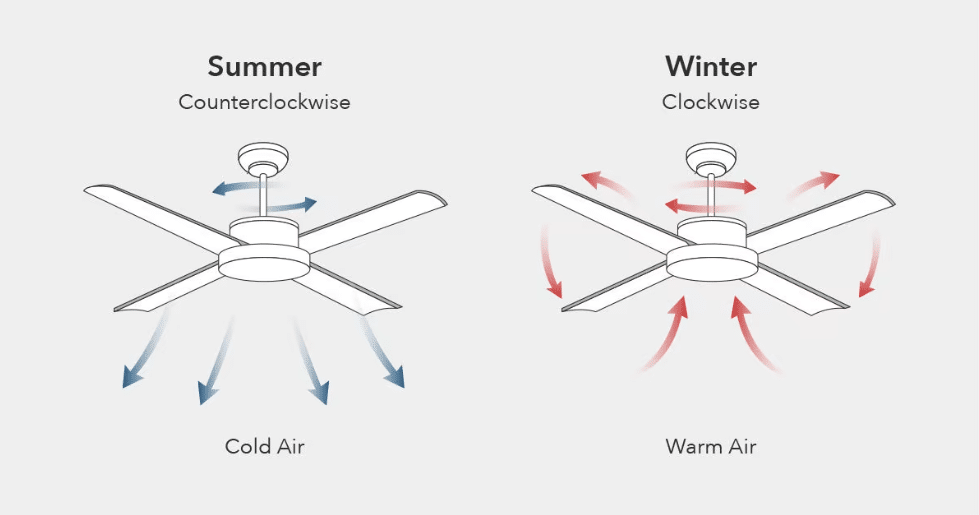
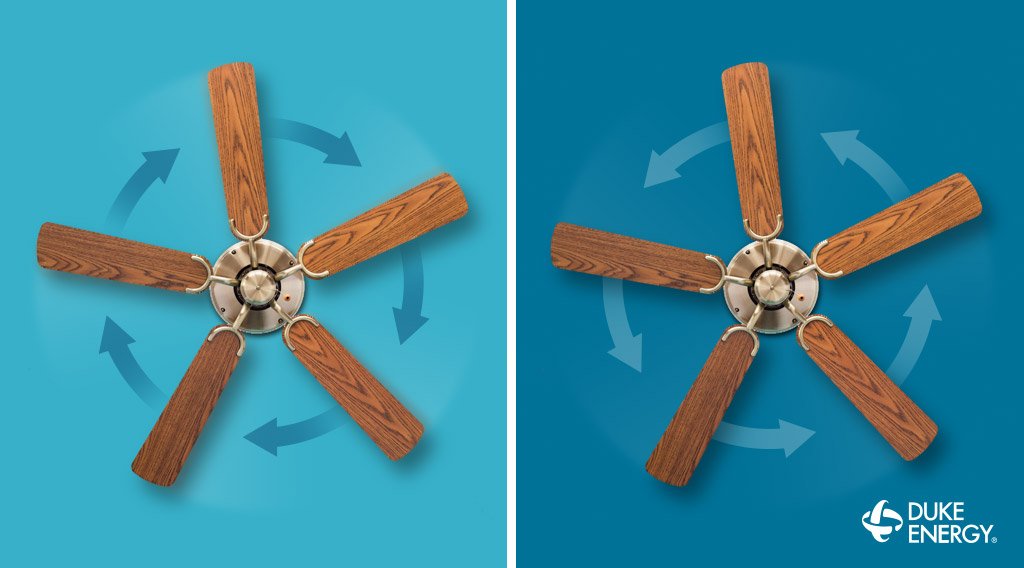
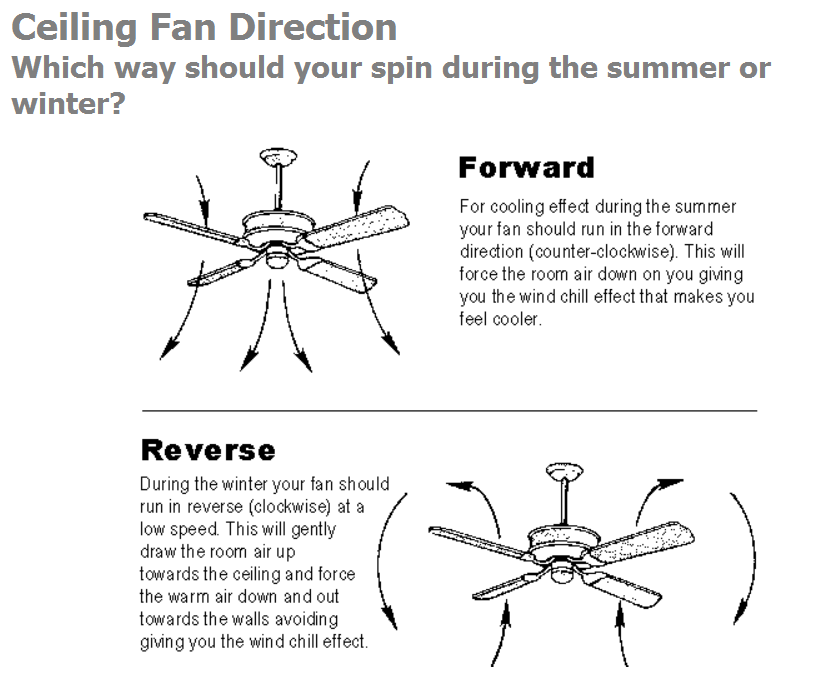
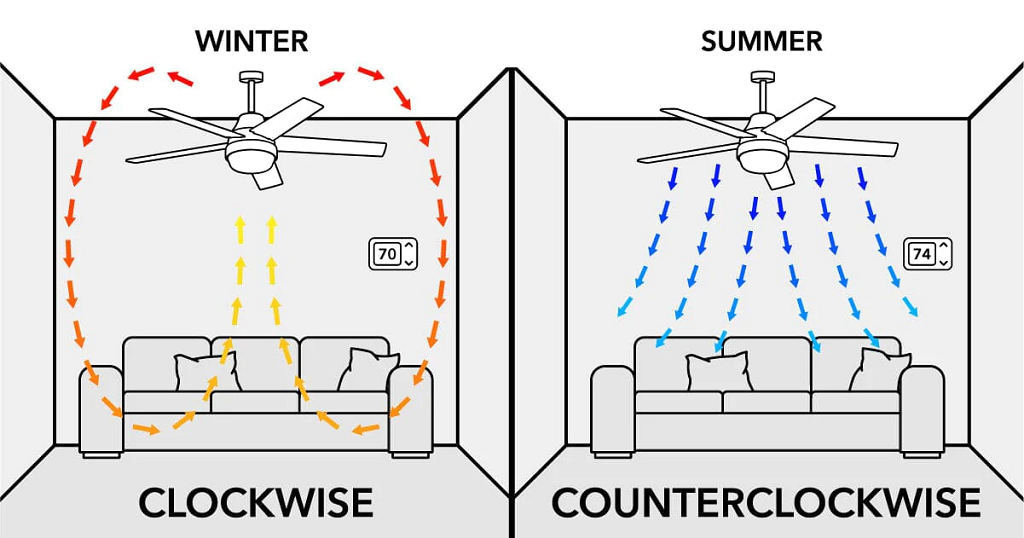
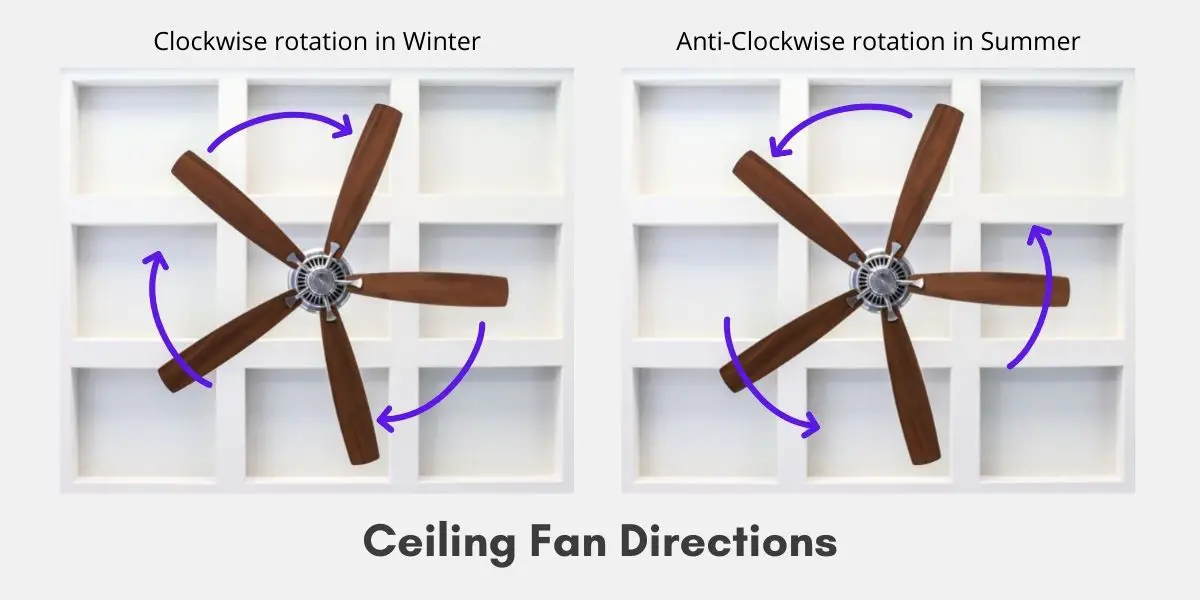
Ceiling fans are designed to spin counterclockwise in the summer to push air downwards, creating a cooling breeze. In the winter, they should spin clockwise to gently pull air upwards, circulating the warm air that rises to the ceiling back down into the room. If your fan is spinning the wrong way, it's essentially working against your comfort.
This article will guide you through the process of determining your fan's rotation, understanding why it matters, and safely fixing the issue. We'll break down the steps in a clear and easy-to-follow manner, empowering you to troubleshoot this common problem yourself. However, we'll also clearly outline when it's time to call in a professional.
Step 1: Observe Your Fan's Rotation
This is the most crucial step. You need to carefully observe which direction your fan is spinning. Here's how to do it safely and effectively:
- Safety First: Ensure the fan is switched on and operating at a low speed. This allows you to observe the rotation without any risk of injury from rapidly moving blades. Never attempt to stop the fan blades with your hands or any object.
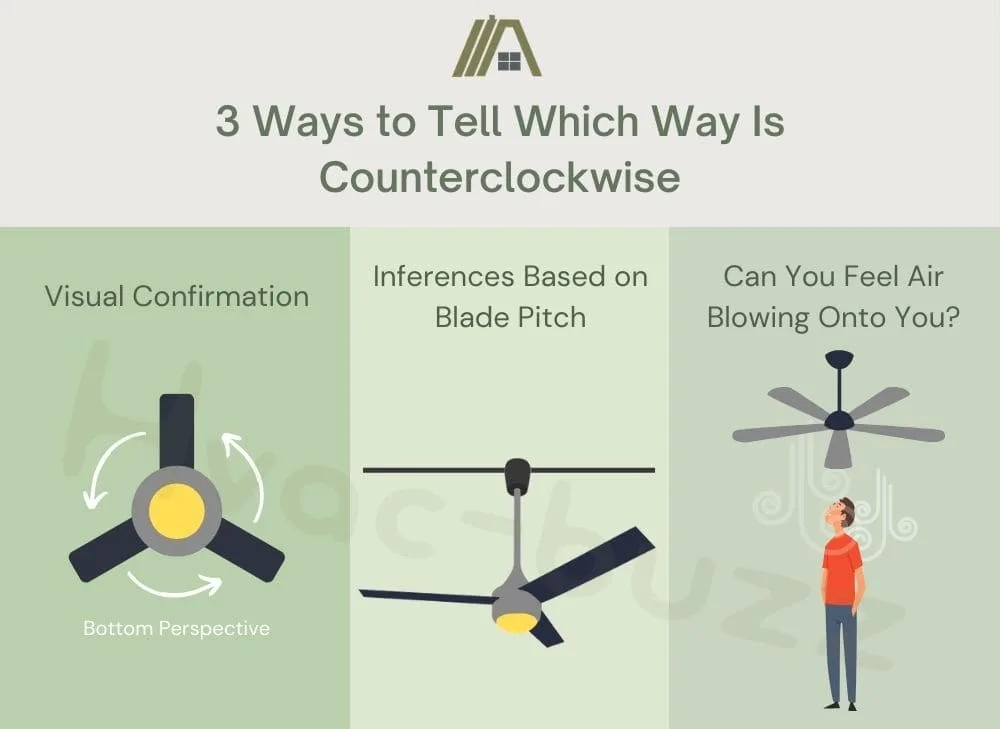
- Visual Observation: Stand directly beneath the fan or slightly to the side. Focus on one of the blades and watch its movement. Does it appear to be moving from left to right, or right to left, as it passes in front of you?
- The Leading Edge: Pay attention to the leading edge of the blade. The leading edge is the part of the blade that "cuts" through the air first. In most fans, the leading edge will be slightly angled. This angle is designed to push the air in a specific direction based on the fan's rotation.
- Imagine a Circle: Imagine a circle in the air, tracing the path of the fan blades. Is the circle going clockwise, or counterclockwise?
Important Note: Don't just glance at the fan and guess. Take your time, and carefully observe the movement. Sometimes, it can be tricky to discern the direction, especially at higher speeds.
Step 2: Understand the Implications of Rotation Direction
Once you've determined the rotation direction, it's important to understand why it matters:
Summer Mode (Counterclockwise):
In the summer, your fan should spin counterclockwise. This creates a downward draft, which feels like a cooling breeze. The angled blades push air downwards, directly onto you. This breeze helps to evaporate perspiration from your skin, making you feel cooler.
Winter Mode (Clockwise):
In the winter, your fan should spin clockwise. This creates an upward draft. This gentle updraft pulls cool air upwards towards the ceiling, which displaces the warm air trapped near the ceiling and pushes it down the walls and back into the room. The goal isn't to create a direct breeze, but to gently circulate the air, evening out the temperature in the room. This helps reduce the strain on your heating system.
Key Takeaway: If your fan is spinning clockwise in the summer, it's working against you. It's pulling air *upwards*, and you're not getting the cooling effect you need. Similarly, a counterclockwise fan in the winter isn't effectively circulating warm air.
Step 3: Locate the Reverse Switch
The key to changing your fan's rotation lies in the reverse switch. This switch is usually located on the motor housing of the fan. Here's how to find it:
- Turn Off the Fan: Before you do anything else, ensure the fan is completely turned off. This is crucial for your safety. Use the wall switch or the pull chain to turn off the fan.
- Locate the Motor Housing: The motor housing is the central part of the fan, where the motor is located. It's usually a round or cylindrical enclosure.
- Search for the Switch: Look for a small switch on the side or top of the motor housing. It may be a sliding switch or a small button. The switch is often labeled with arrows indicating the clockwise and counterclockwise directions, or with "Summer/Winter" settings.
- Consult Your Manual: If you're having trouble finding the switch, consult your fan's instruction manual. The manual will provide specific information on the location and operation of the reverse switch. If you don't have the manual, you can usually find it online by searching for the fan's model number.
Important Note: Some older fans may not have a reverse switch. If you can't find a switch on your fan, it's possible that it's an older model designed to only spin in one direction. These fans may be difficult or impossible to reverse without replacing the entire fan.
Step 4: Reverse the Fan's Direction
Now that you've located the reverse switch, you can change the fan's direction:
- Ensure the Fan is Off: Double-check that the fan is completely off before proceeding.
- Flip the Switch: Carefully flip the reverse switch to the opposite position. If it's a sliding switch, slide it to the other side. If it's a button, press it.
- Test the Fan: Turn the fan back on at a low speed and observe the rotation. Make sure it's now spinning in the desired direction (counterclockwise for summer, clockwise for winter).
- Repeat if Necessary: If the fan is still spinning in the wrong direction, turn it off again and double-check the position of the reverse switch. Sometimes, the switch can be finicky, and you may need to flip it a few times to get it to work.
Pro Tip: After changing the direction, allow the fan to run for a few minutes to ensure the change is stable and the fan is operating smoothly.
Step 5: Verify Proper Airflow
After reversing the fan's direction, it's crucial to verify that it's actually improving airflow. This will confirm that the direction change was successful and that the fan is now working as intended:
Summer (Counterclockwise):
Stand directly underneath the fan. You should feel a noticeable downward breeze. The air should be moving downwards, towards your body. If you don't feel a breeze, or if you feel air being pulled upwards, the fan may not be spinning correctly, or there may be another issue.
Winter (Clockwise):
Stand near the edge of the room, away from the direct path of the fan blades. You shouldn't feel a strong breeze. Instead, you should notice a more even distribution of temperature throughout the room. If you have a thermometer, you can check the temperature near the ceiling and near the floor. In winter mode, you should see a smaller temperature difference between these two locations than you would with the fan off. The goal is to circulate the heated air near the ceiling downward.
Troubleshooting Airflow Issues: If you're not experiencing the expected airflow after reversing the fan's direction, consider the following:
- Blade Pitch: The angle of the fan blades (the "pitch") can affect airflow. If the blades are too flat, they may not move air effectively. However, you typically cannot adjust the blade pitch on a ceiling fan.
- Fan Speed: Make sure you're using an appropriate fan speed for the season. Higher speeds are usually better for summer, while lower speeds are more suitable for winter.
- Room Size: The size of the room can affect the fan's effectiveness. A small fan may not be sufficient to circulate air in a large room.
- Obstructions: Make sure there are no obstructions that are blocking airflow to and from the fan.
When to Call a Professional
While reversing a ceiling fan's direction is a relatively simple task, there are certain situations where it's best to call a qualified electrician:
- Electrical Issues: If you notice any sparks, smoke, or burning smells coming from the fan, immediately turn off the power at the breaker and call an electrician. Do not attempt to fix the fan yourself.
- Wiring Problems: If you suspect there's a problem with the fan's wiring (e.g., loose wires, damaged insulation), it's best to have an electrician inspect and repair the wiring.
- Fan Not Responding: If the fan doesn't turn on at all, even after checking the breaker and the wall switch, there may be a problem with the motor or the wiring. An electrician can diagnose the issue and recommend the appropriate repair.
- Unfamiliar with Electrical Work: If you're not comfortable working with electricity, or if you're unsure about any of the steps involved in troubleshooting the fan, it's always best to err on the side of caution and call an electrician.
- Fan is Unstable: If the fan is wobbling excessively or making unusual noises, it could be a sign of a loose mounting bracket or other structural issue. An electrician can safely inspect the fan and make any necessary repairs.
- No Reverse Switch and Desire to Reverse: If your fan doesn't have a reverse switch and you want to be able to reverse the direction, you might need to replace the entire fan or, in some cases, replace the motor with a reversible one. This is best left to a professional.
Remember: Working with electricity can be dangerous. Always prioritize your safety and consult a professional when in doubt. An electrician can ensure that your fan is installed and operating safely and efficiently.
By following these steps, you can easily troubleshoot and fix the direction of your ceiling fan, ensuring optimal comfort and energy efficiency in your home. Remember to always prioritize safety and seek professional help when needed.