Hvac Cooling Systems For Data Centers
Keeping Cool Under Pressure: A Guide to HVAC Cooling Systems for Data Centers
Data centers, the humming hubs of the digital age, are power-hungry beasts. They generate massive amounts of heat, and maintaining a stable temperature is absolutely critical for optimal performance and preventing equipment failure. Choosing the right HVAC cooling system for a data center is a complex decision with significant financial and operational implications. This guide will walk you through the key considerations, different cooling system types, and factors influencing cost, helping you make an informed choice.
Why is Cooling So Important in Data Centers?
Servers, storage devices, and networking equipment all produce heat as a byproduct of their operation. Excessive heat can lead to:
- Reduced Performance: High temperatures can throttle CPU performance, slowing down processing speeds.
- Hardware Failure: Overheating can damage sensitive electronic components, leading to premature failure and costly downtime.
- Increased Energy Consumption: Inefficient cooling systems waste energy and drive up operating expenses.
- Data Corruption: Extreme heat can corrupt data stored on hard drives and other storage media.
Effective cooling is not just about preventing damage; it's about maintaining optimal performance, ensuring data integrity, and minimizing operational costs.
Types of Data Center Cooling Systems
Several cooling system options are available for data centers, each with its own advantages and disadvantages. The best choice depends on factors like the size of the data center, power density, climate, and budget.
1. Computer Room Air Conditioners (CRACs)
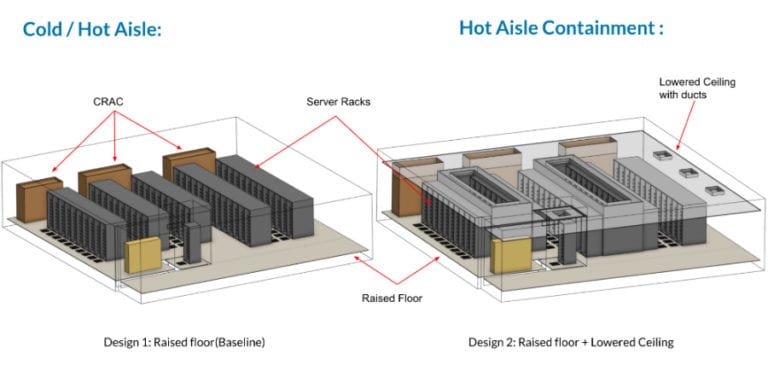
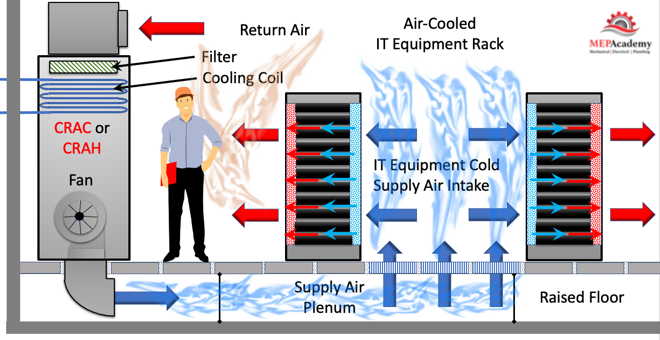
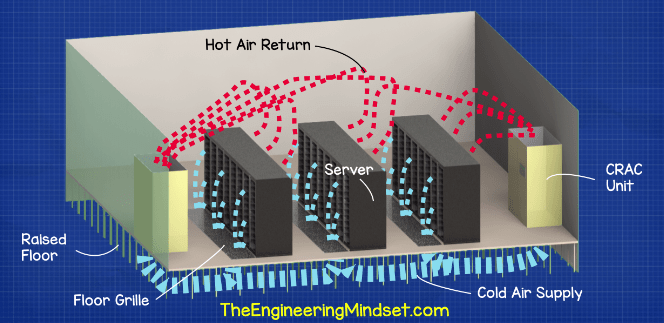
CRAC units are the most traditional cooling solution for data centers. They are self-contained units that circulate chilled air throughout the server room.
Pros:
- Relatively Inexpensive: Compared to other options, CRAC units are generally more affordable to purchase and install.
- Easy to Maintain: Their straightforward design makes them relatively easy to maintain and service.
- Suitable for Smaller Data Centers: CRAC units are well-suited for smaller data centers with lower power densities.
Cons:
- Less Energy Efficient: CRAC units typically have lower energy efficiency than newer cooling technologies.
- Hot Spots: They can create hot spots if the airflow is not properly managed.
- Limited Scalability: Scaling up cooling capacity can be challenging and may require adding multiple CRAC units.
Key Features:
- Air-Cooled vs. Water-Cooled: CRAC units can be air-cooled (using outside air) or water-cooled (using a chilled water system).
- Upflow vs. Downflow: Upflow units draw air from the bottom and discharge it from the top, while downflow units do the opposite.
- Variable Speed Fans: Some CRAC units feature variable speed fans for improved energy efficiency.
Brands: Liebert, Stulz, Data Aire
2. Computer Room Air Handlers (CRAHs)
CRAH units are similar to CRAC units, but they don't have their own refrigeration system. Instead, they rely on a central chilled water plant to provide cooling.
Pros:
- Higher Energy Efficiency: CRAH units are generally more energy-efficient than CRAC units.
- Better Scalability: They can be easily integrated with a central chilled water plant, allowing for greater scalability.
- Precise Temperature Control: CRAH units offer precise temperature and humidity control.
Cons:
- Higher Initial Cost: CRAH units require a central chilled water plant, which can be a significant upfront investment.
- More Complex Installation: Installation is more complex than with CRAC units.
- Dependency on Chilled Water Plant: CRAH units are dependent on the reliability of the central chilled water plant.
Key Features:
- Chilled Water Coils: CRAH units use chilled water coils to cool the air.
- Variable Speed Fans: Variable speed fans optimize airflow and energy efficiency.
- Advanced Controls: Advanced control systems allow for precise temperature and humidity management.
Brands: Liebert, Stulz, Johnson Controls
3. Row-Based Cooling
Row-based cooling systems are installed within the rows of server racks, providing targeted cooling to the areas that need it most.
Pros:
- Improved Efficiency: Row-based cooling systems provide targeted cooling, reducing energy waste.
- Elimination of Hot Spots: They effectively eliminate hot spots by delivering cool air directly to the servers.
- Scalability: Row-based cooling systems can be easily scaled as the data center grows.
Cons:
- Higher Cost: They are generally more expensive than CRAC units.
- Requires Careful Planning: Proper planning is essential to ensure effective airflow and prevent hot spots.
- May Require Raised Floor: Some row-based cooling systems require a raised floor for installation.
Key Features:
- Close-Coupled Cooling: Row-based cooling systems are located close to the heat source.
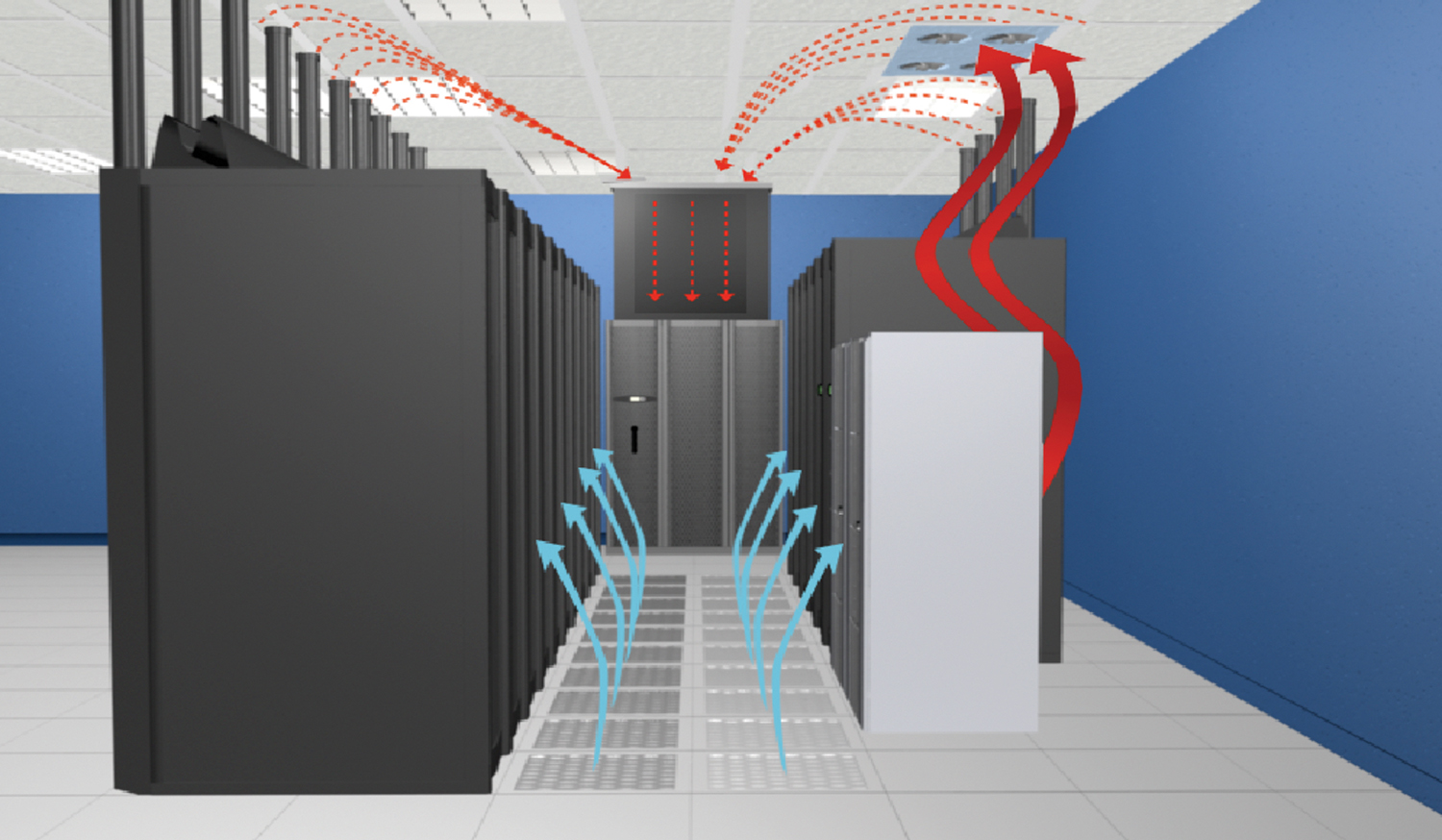
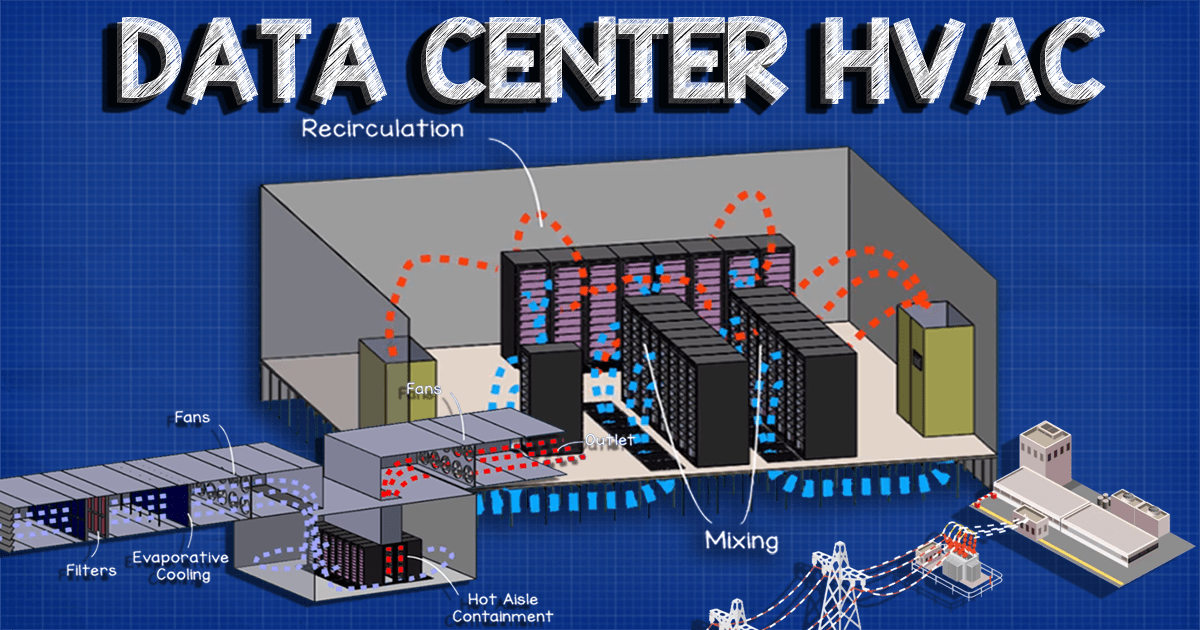
- Containment Systems: Hot aisle/cold aisle containment systems further improve efficiency.
- Monitoring and Control: Advanced monitoring and control systems allow for real-time performance optimization.
Brands: Schneider Electric, Rittal, Eaton
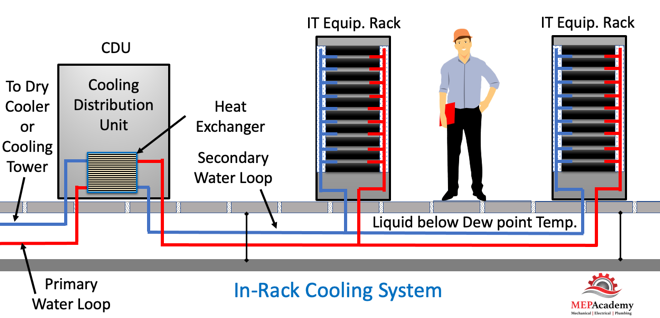
4. Direct Liquid Cooling
Direct liquid cooling involves circulating a coolant directly over the heat-generating components, such as CPUs and GPUs.
Pros:
- Extremely High Efficiency: Direct liquid cooling offers the highest cooling efficiency of any technology.
- High Power Density: It allows for extremely high power densities, making it ideal for high-performance computing environments.
- Reduced Noise: Liquid cooling is significantly quieter than air cooling.
Cons:
- High Cost: Direct liquid cooling systems are the most expensive option.
- Complex Installation: Installation is complex and requires specialized expertise.
- Potential for Leaks: There is a risk of leaks, which can damage sensitive electronic equipment.
Key Features:
- Cold Plates: Cold plates are attached directly to the heat-generating components.
- Coolant Distribution Units (CDUs): CDUs circulate the coolant and maintain its temperature.
- Leak Detection Systems: Leak detection systems are crucial for preventing damage from leaks.
Brands: Asetek, CoolIT Systems, LiquidStack
5. Free Cooling
Free cooling utilizes naturally cool sources, such as outside air or water, to cool the data center.
Pros:
- Significant Energy Savings: Free cooling can significantly reduce energy consumption and operating costs.
- Environmentally Friendly: It reduces reliance on traditional cooling methods, minimizing environmental impact.
Cons:
- Climate Dependent: Free cooling is only effective in climates with consistently cool temperatures.
- Requires Specialized Equipment: It requires specialized equipment, such as air-side economizers or water-side economizers.
- Potential for Contamination: Outside air can contain contaminants that can damage sensitive electronic equipment.
Key Features:
- Air-Side Economizers: Air-side economizers use outside air to cool the data center.
- Water-Side Economizers: Water-side economizers use cool water from a lake or river to cool the data center.
- Filtration Systems: Filtration systems are essential for removing contaminants from the air.
Brands: Many manufacturers offer free cooling options, often integrated into their CRAC, CRAH, and chiller systems.
Factors Influencing the Cost of Data Center Cooling Systems
The cost of a data center cooling system can vary widely depending on several factors:
- Size of the Data Center: Larger data centers require more cooling capacity, increasing the cost.
- Power Density: Higher power densities require more sophisticated and expensive cooling solutions.
- Type of Cooling System: Direct liquid cooling is generally the most expensive, while CRAC units are the least expensive.
- Installation Costs: Installation costs can vary depending on the complexity of the system and the location of the data center.
- Energy Efficiency: More energy-efficient systems typically have a higher upfront cost but lower operating costs.
- Maintenance Costs: Regular maintenance is essential for ensuring optimal performance and preventing downtime.
It's important to consider the total cost of ownership (TCO), which includes both the upfront cost and the ongoing operating and maintenance costs.
Key Considerations for Choosing a Data Center Cooling System
Before selecting a cooling system for your data center, consider the following factors:
- Redundancy: Ensure that the cooling system has sufficient redundancy to prevent downtime in the event of a failure.
- Scalability: Choose a system that can be easily scaled as the data center grows.
- Energy Efficiency: Prioritize energy efficiency to minimize operating costs and environmental impact.
- Monitoring and Control: Implement a robust monitoring and control system to track performance and identify potential problems.
- Maintenance: Develop a comprehensive maintenance plan to ensure optimal performance and prevent downtime.
- Regulations: Be aware of any local regulations regarding energy efficiency and environmental impact.
AFUE, SEER, and HSPF Ratings (While not directly applicable to most data center cooling systems):
It's important to note that AFUE (Annual Fuel Utilization Efficiency), SEER (Seasonal Energy Efficiency Ratio), and HSPF (Heating Seasonal Performance Factor) are primarily used for rating the efficiency of residential and commercial heating and cooling systems like furnaces, air conditioners, and heat pumps. These ratings are not typically applied to the specialized cooling systems used in data centers. The efficiency of data center cooling is often measured using metrics like Power Usage Effectiveness (PUE).
Warranties and Maintenance
Data center cooling systems represent a significant investment, and understanding the warranty and maintenance requirements is crucial for protecting that investment.
Warranties:
- Standard Warranties: Most manufacturers offer standard warranties that cover defects in materials and workmanship for a specified period (e.g., 1-3 years).
- Extended Warranties: Extended warranties can provide additional coverage and peace of mind. Consider purchasing an extended warranty if you want to protect against unexpected repair costs.
- Warranty Terms: Carefully review the warranty terms and conditions to understand what is covered and what is not. Pay attention to exclusions, such as damage caused by improper maintenance or misuse.
Maintenance:
- Preventative Maintenance: Regular preventative maintenance is essential for ensuring optimal performance and preventing downtime. This includes tasks such as cleaning coils, checking refrigerant levels, and inspecting electrical connections.
- Scheduled Maintenance: Develop a scheduled maintenance plan that outlines the specific tasks that need to be performed and the frequency at which they should be performed.
- Qualified Technicians: Always use qualified technicians to perform maintenance and repairs on data center cooling systems.
- Maintenance Contracts: Consider entering into a maintenance contract with a reputable HVAC service provider. This can provide peace of mind and ensure that your cooling system is properly maintained.
Conclusion
Choosing the right HVAC cooling system for a data center is a critical decision that can significantly impact performance, reliability, and operating costs. By carefully considering the factors outlined in this guide, you can make an informed choice that meets the specific needs of your data center.