
Masterbuilt Digital Control Panel Kit
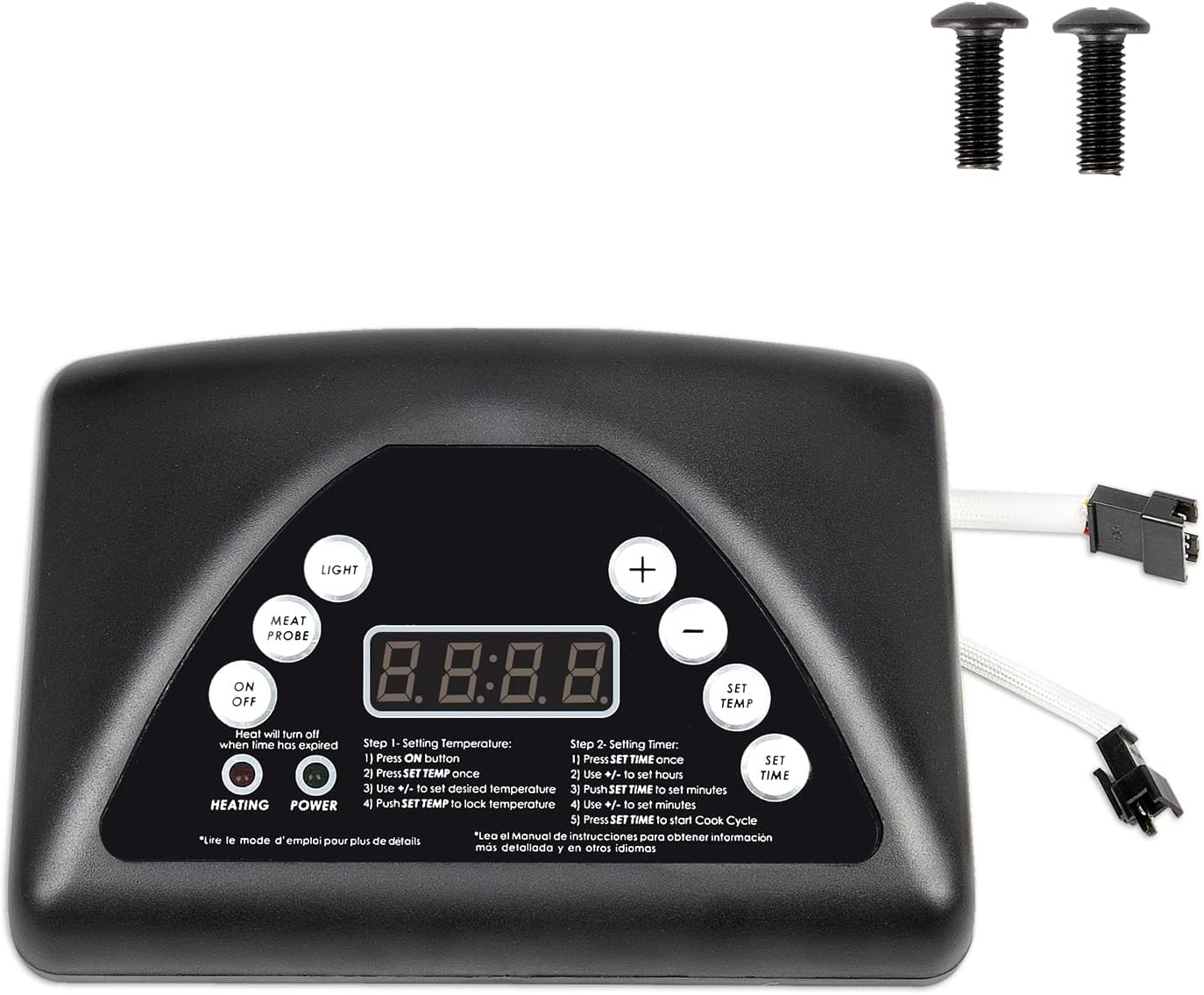
One of the most frustrating issues homeowners face with their Masterbuilt electric smokers is a malfunctioning digital control panel. Imagine prepping your favorite cut of meat, only to find the smoker refusing to heat up, displaying error codes, or generally acting unresponsive. Before you throw in the towel, let's walk through some common problems and how to troubleshoot them yourself. This guide offers simple, safe DIY fixes to get you back to smoking in no time.
Diagnosing Common Digital Control Panel Problems
Let's break down the common culprits behind a temperamental Masterbuilt digital control panel:
- Power Issues: This includes no power at all, flickering displays, or the unit shutting off unexpectedly.
- Temperature Fluctuations: The smoker might not reach the set temperature, or it could fluctuate wildly.
- Error Codes: The display might show specific error codes (like "Err1", "Err2", or "Err3"), indicating a problem.
- Unresponsive Buttons: The buttons on the panel might not register when pressed.
- Auger Problems (if applicable): For pellet smokers, the auger might not be feeding pellets correctly.
Step 1: Power Source Check
The first and simplest step is to verify the power source. Even if you *think* it's plugged in correctly, double-check:
- Inspect the Power Cord: Look for any visible damage, cuts, or frayed wires on the power cord. A damaged cord is a serious safety hazard and needs to be replaced.
- Test the Outlet: Plug another appliance into the same outlet to ensure it's working. A faulty outlet could be the problem. If the outlet is dead, check your circuit breaker or fuse box.
- Extension Cord Usage: Avoid using extension cords if possible. If you *must* use one, make sure it's a heavy-duty, outdoor-rated extension cord with the appropriate amperage rating for your smoker. A lightweight extension cord can cause voltage drops, leading to performance issues and potentially damaging the control panel.
If the power cord is damaged or the outlet is faulty, *do not* attempt to repair them yourself unless you are a qualified electrician. Replace the cord or consult an electrician to fix the outlet.
Step 2: Inspect the Control Panel Connections
The digital control panel relies on secure connections to various components within the smoker. Loose or corroded connections can cause all sorts of problems.
- Unplug the Smoker: *Always* unplug the smoker from the power outlet before inspecting any internal components. This is crucial for your safety.
- Access the Control Panel: Depending on your model, you may need to remove a few screws to access the back of the control panel. Consult your owner's manual for specific instructions.
- Check the Wiring: Carefully inspect the wiring connections to the control panel. Look for any loose wires, corroded terminals, or damaged connectors. Gently wiggle each connection to see if it feels secure.
- Re-Seat Connections: If you find any loose connections, carefully disconnect and reconnect them. Make sure they are firmly seated. You can use a small brush to clean any corrosion from the terminals (disconnect power and use appropriate safety measures).
Important: Take pictures of the wiring before disconnecting anything. This will help you remember how to reconnect everything correctly. If you are uncomfortable working with wiring, it's best to consult a qualified appliance repair technician.
Step 3: Addressing Error Codes
Error codes are your smoker's way of telling you something is wrong. Consult your owner's manual to understand what each error code means. Here are some common error codes and their potential solutions:
- "Err1" (Temperature Sensor Error): This often indicates a problem with the temperature probe.
- Check the Probe Connection: Ensure the temperature probe is securely connected to the control panel.
- Inspect the Probe Wiring: Look for any damage to the probe wiring.
- Test the Probe (Advanced): Using a multimeter, you can test the resistance of the temperature probe. Compare the reading to the specifications in your owner's manual. If the resistance is out of range, the probe needs to be replaced. Note: This requires some electrical knowledge and a multimeter.
- Replace the Probe: If the probe is faulty, you'll need to replace it with a new one. You can usually order a replacement probe directly from Masterbuilt or from online retailers.
- "Err2" (Over Temperature Error): This indicates that the smoker is overheating.
- Check the Temperature Setting: Make sure you haven't set the temperature too high.
- Clean the Smoker: Excess grease and buildup can cause the smoker to overheat. Clean the inside of the smoker thoroughly.
- Check the Vent: Ensure the vent is open to allow for proper airflow.
- Inspect the Heating Element: Make sure the heating element is not damaged or shorted out. A visual inspection is usually sufficient.
- "Err3" (Heating Element Error): This usually points to a problem with the heating element.
- Inspect the Heating Element: Visually inspect the heating element for any signs of damage, such as cracks, breaks, or burn marks.
- Test the Heating Element (Advanced): Using a multimeter, you can test the continuity of the heating element. If there is no continuity, the heating element is faulty and needs to be replaced. Note: This requires some electrical knowledge and a multimeter.
- Replace the Heating Element: If the heating element is faulty, you'll need to replace it with a new one.
Important: Always consult your owner's manual for specific error code definitions and troubleshooting steps for your particular model.
Step 4: Dealing with Unresponsive Buttons
If the buttons on your control panel are not responding, try these steps:
- Power Cycle the Smoker: Unplug the smoker from the power outlet, wait for a few minutes, and then plug it back in. This can sometimes reset the control panel and resolve minor glitches.
- Clean the Control Panel: Dirt, grease, or grime can sometimes interfere with the button contacts. Use a clean, damp cloth to wipe the control panel thoroughly. Avoid using harsh chemicals or abrasive cleaners.
- Check for Moisture: Moisture can also cause problems with the buttons. If you suspect moisture is the issue, try using a hairdryer on a low setting to gently dry the control panel.
- Button Membrane Damage: If the above steps don't work, the button membrane inside the control panel might be damaged. Disassembling the control panel and replacing the membrane is possible, but it's generally a complex repair best left to a professional.
Step 5: Auger Troubleshooting (Pellet Smokers Only)
If you have a Masterbuilt pellet smoker, the auger is responsible for feeding pellets into the firepot. If the auger is not working correctly, the smoker won't maintain the proper temperature.
- Check the Hopper: Make sure the hopper is full of pellets. An empty hopper is the most common cause of auger problems.
- Inspect for Blockages: Check for any blockages in the auger tube. Old pellets, debris, or foreign objects can clog the auger. You may need to disassemble the auger tube to remove the blockage.
- Listen for the Auger Motor: When you turn on the smoker, listen for the auger motor. If you don't hear the motor running, it could be faulty.
- Auger Motor Testing (Advanced): If you suspect the auger motor is faulty, you can test it using a multimeter. Disconnect the motor from the control panel and check for continuity. If there is no continuity, the motor needs to be replaced. Note: This requires some electrical knowledge and a multimeter.
- Replace the Auger Motor: If the auger motor is faulty, you'll need to replace it with a new one.
When to Call a Professional
While many digital control panel problems can be resolved with simple DIY fixes, there are certain situations where it's best to call a qualified appliance repair technician:
- You are uncomfortable working with electricity. Safety should always be your top priority. If you are not comfortable working with electrical components, don't risk it.
- You have tried all the troubleshooting steps and the problem persists. If you've exhausted all the DIY solutions and the control panel is still not working correctly, it's time to call in a professional.
- You suspect a major component failure. If you suspect that the control panel itself is faulty or that a major component like the heating element or auger motor needs to be replaced, it's usually best to have a professional handle the repair.
- The smoker is still under warranty. If your smoker is still under warranty, attempting to repair it yourself could void the warranty. Contact Masterbuilt or an authorized service center for warranty repairs.
Specifically, the following conditions always warrant professional assistance:
- Visible signs of burning or electrical arcing inside the control panel.
- If replacing a component requires soldering or more in-depth electrical knowledge.
- If the control panel consistently throws errors after attempted fixes.
Preventative Maintenance
Prevention is always better than cure. Here are some tips to help keep your Masterbuilt digital control panel in good working order:
- Clean the Smoker Regularly: Regularly clean the inside of the smoker to remove grease and buildup. This will help prevent overheating and other problems.
- Protect the Control Panel from the Elements: If you store your smoker outdoors, cover the control panel to protect it from rain, snow, and sun.
- Use a Surge Protector: Plug your smoker into a surge protector to protect the control panel from power surges.
- Store Pellets Properly: If you have a pellet smoker, store your pellets in a dry, airtight container to prevent them from getting damp or moldy.
- Follow Manufacturer's Instructions: Always follow the manufacturer's instructions for operating and maintaining your smoker.
By following these troubleshooting steps and preventative maintenance tips, you can keep your Masterbuilt digital control panel working properly and enjoy many years of delicious smoked food.


