Symbols For Air Conditioner Remote Control
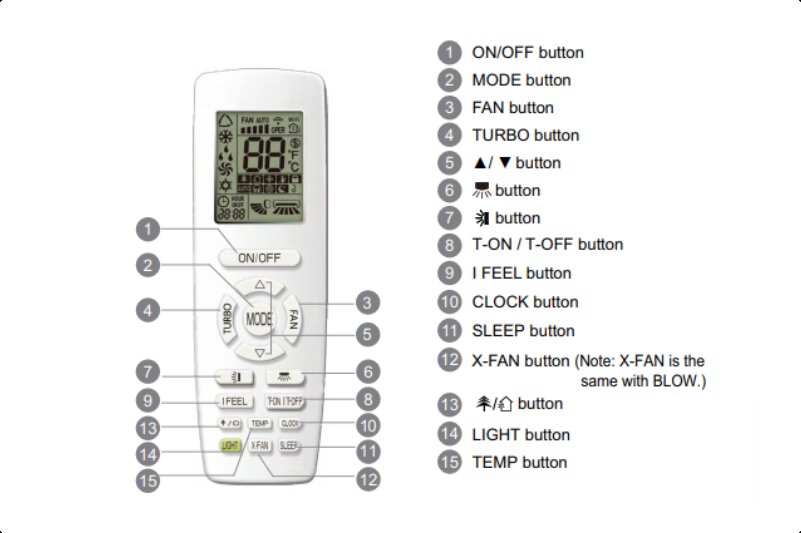
Understanding your air conditioner remote control is the first step to optimizing your home's cooling and comfort. While remote designs vary by manufacturer, many use similar symbols and abbreviations to indicate functions. This guide will help you decipher those symbols and troubleshoot common issues.
Decoding the Symbols: A Comprehensive Guide
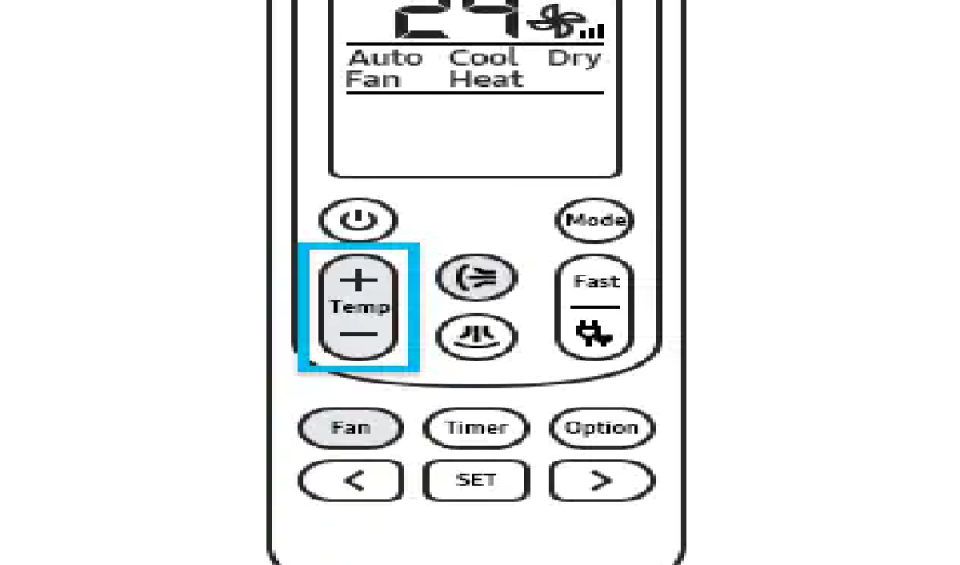
Most air conditioner remotes feature a combination of buttons and a display screen. The screen shows the current settings, while the buttons allow you to adjust them. Here's a breakdown of common symbols you'll encounter:
Power Button (On/Off)
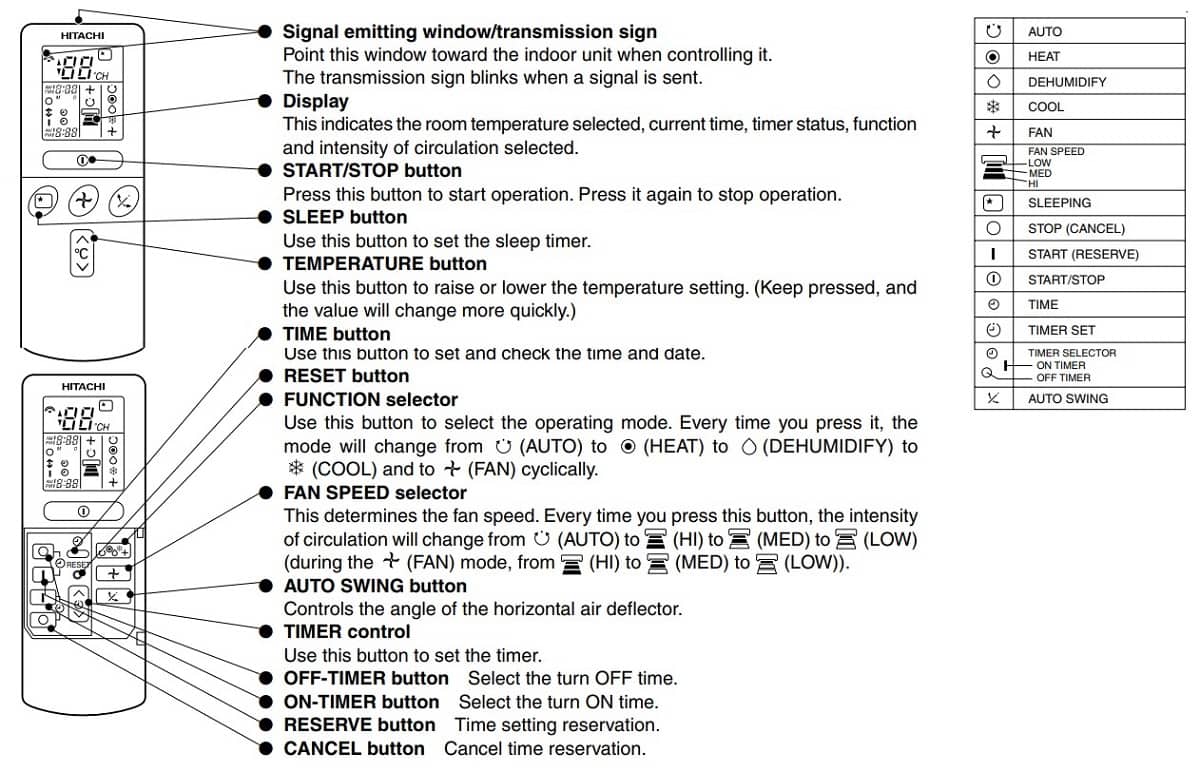
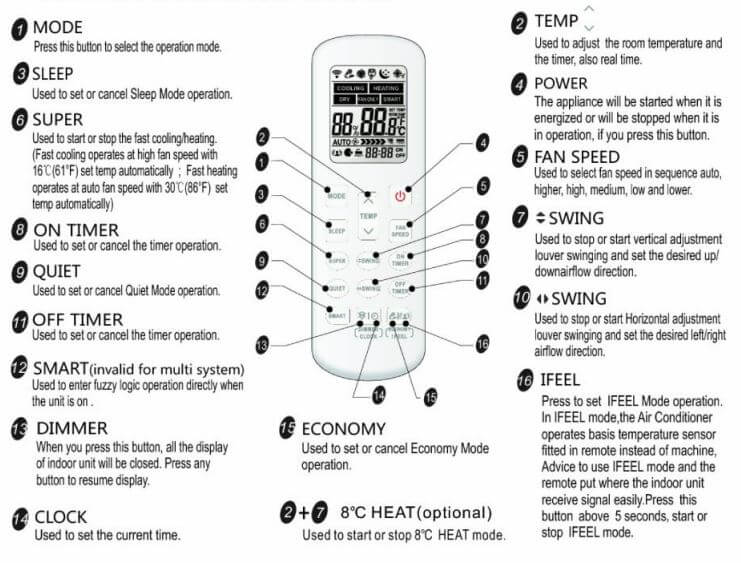
The power button is usually represented by a circle with a vertical line inside it, or simply the word "ON/OFF". Pressing this button toggles the air conditioner between on and off states.
Mode Button
The MODE button allows you to select the operating mode of your air conditioner. Common modes include:
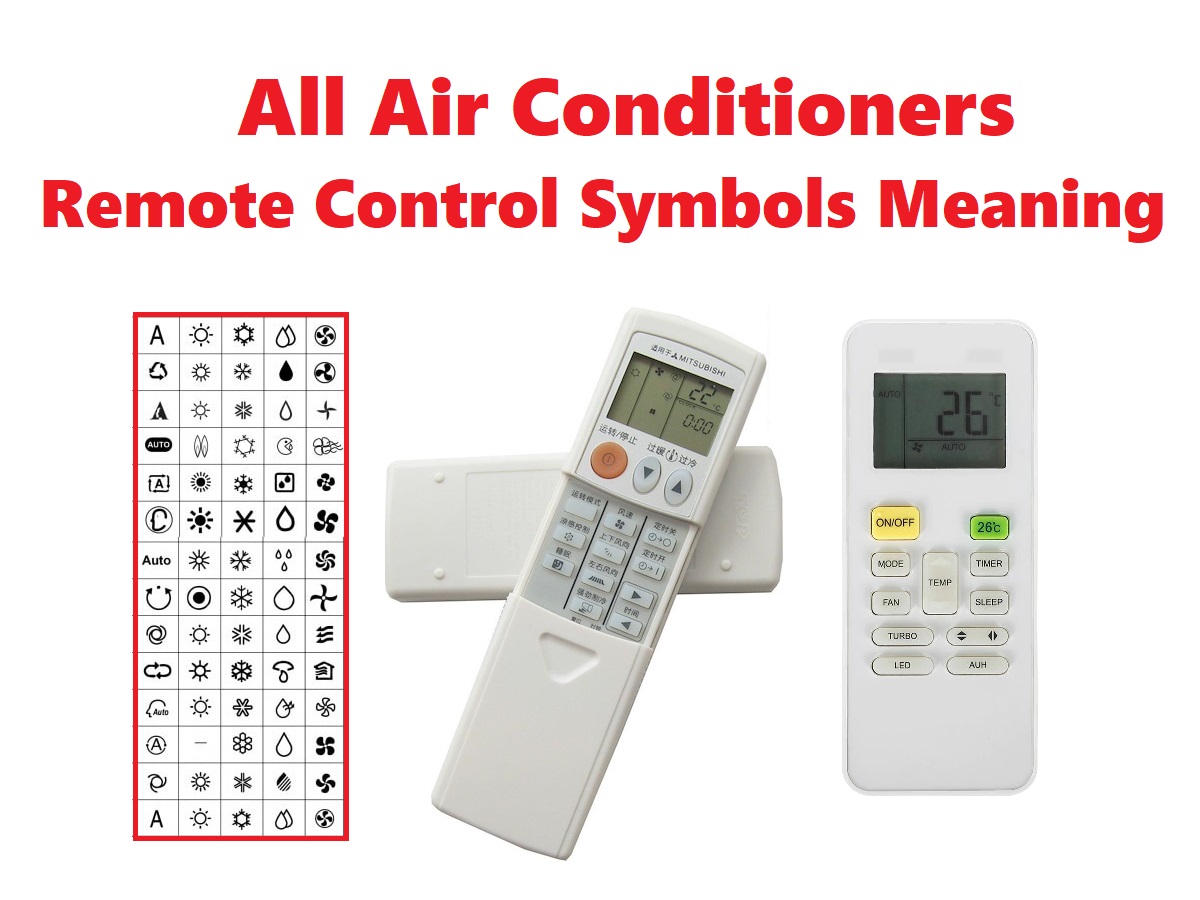
- Cool Mode (Snowflake symbol): This is the standard cooling mode where the AC actively cools the room to the set temperature.
- Heat Mode (Sun symbol): If your AC unit has a heat pump, this mode allows it to provide heat.
- Auto Mode (A symbol or "AUTO"): The AC automatically selects the cooling or heating mode based on the room temperature.
- Dry Mode (Water droplet symbol): This mode reduces humidity in the room, often used in damp climates. It operates with lower fan speed and cooling intensity.
- Fan Mode (Fan symbol): In this mode, only the fan runs, circulating air without cooling or heating.
Temperature Control (+/- or Up/Down Arrows)
These buttons, marked with plus (+) and minus (-) signs or up and down arrows, allow you to increase or decrease the desired room temperature. The temperature is usually displayed in Celsius or Fahrenheit on the remote's screen.
Fan Speed Button (Fan Icon with Varying Blades or "FAN")
The fan speed button controls the speed of the indoor fan. You can usually select from low, medium, high, and sometimes auto. The symbol is often a fan icon with varying numbers of blades or lines indicating the speed.
Swing/Louver Control (Airflow Direction)
This button controls the vertical or horizontal movement of the air conditioner's louvers. Symbols include:
- Vertical Swing (Up and down arrows with a line in between): The louvers automatically move up and down to distribute air evenly.
- Horizontal Swing (Left and right arrows with a line in between): Some units allow horizontal swing for wider airflow.
- Fixed Louver Position: You can often stop the swing at a desired angle by pressing the button again.
Timer Button (Clock Symbol or "TIMER")
The timer function allows you to set the air conditioner to turn on or off automatically at a specified time. You'll usually need to set the desired time using the temperature control buttons and confirm the setting with the timer button again.
Sleep Mode (Moon Symbol or "SLEEP")
Sleep mode is designed to provide comfortable sleeping conditions. It typically increases the set temperature by a degree or two over time and reduces fan speed to minimize noise. This helps save energy and prevents the room from becoming too cold during the night.
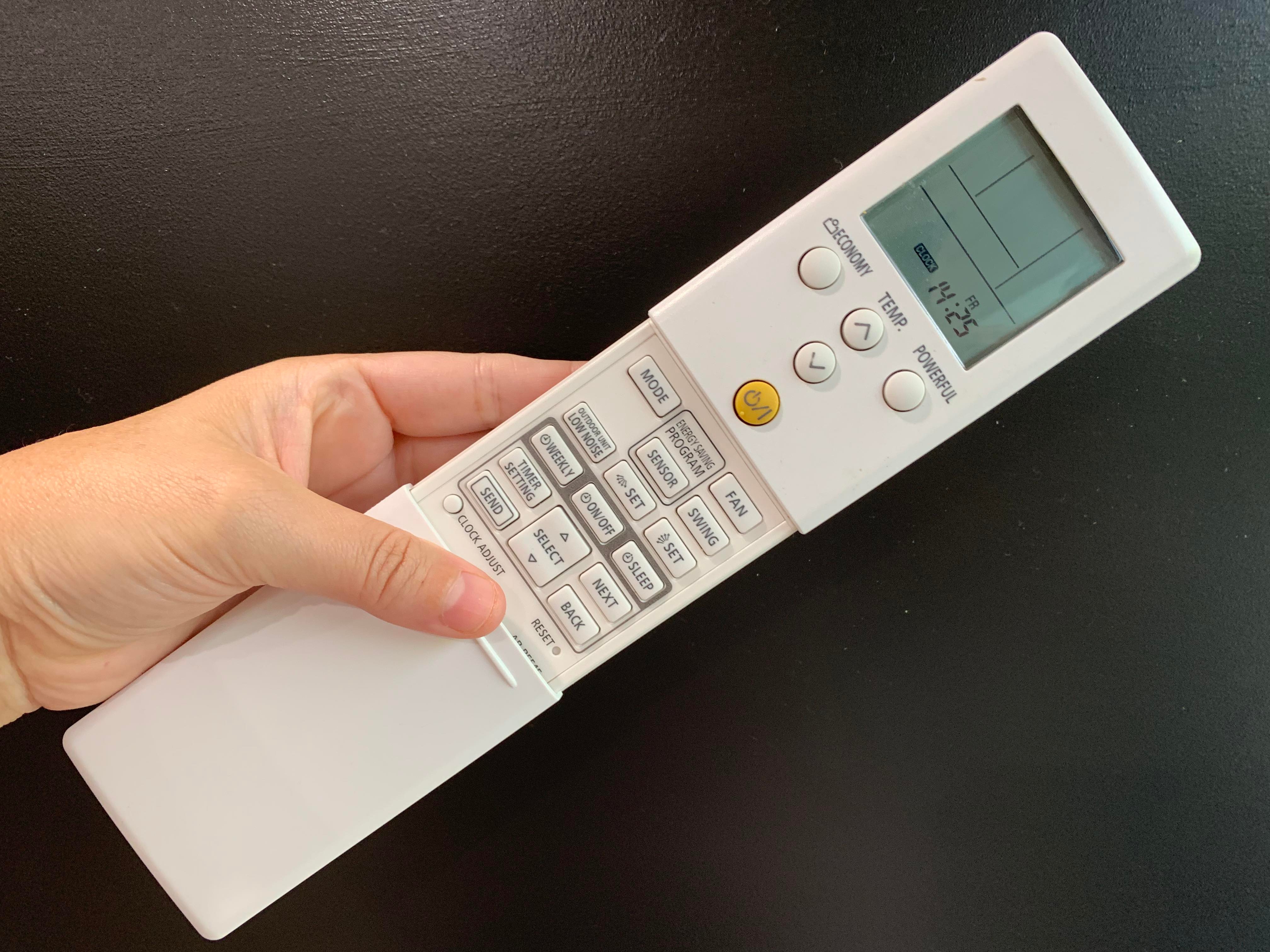
Turbo/Powerful Mode (Star Symbol or "TURBO"/"POWERFUL")
This mode runs the air conditioner at its maximum cooling capacity for a short period to quickly cool down the room. The fan speed will be at its highest, and the compressor will work at full power.
Eco Mode (Leaf Symbol or "ECO")
Eco mode is designed to save energy by optimizing the cooling or heating process. It typically limits the compressor's output and adjusts the fan speed to reduce power consumption.
Clean/Filter Reset (Filter Symbol or "CLEAN"/"FILTER")
This button is used to reset the filter reminder. After cleaning or replacing the air filter, press and hold this button for a few seconds to reset the timer. Some units have a dedicated indicator light on the unit itself that turns on when the filter needs cleaning.
I Feel/Follow Me (Person Symbol or "I FEEL"/"FOLLOW ME")
This feature uses a sensor in the remote control to measure the temperature around the remote. The air conditioner then adjusts its output to maintain the set temperature in the remote's location, providing more personalized comfort.
Troubleshooting Common Remote Control Problems
Sometimes, your air conditioner remote may not work correctly. Here are some common issues and how to address them:
- Remote Not Responding:
- Check the batteries: Replace the batteries with new ones of the correct type.
- Check the battery polarity: Ensure the batteries are inserted correctly, matching the + and - markings.
- Clean the remote: Use a soft, dry cloth to clean the remote's surface and the battery contacts.
- Check the IR sensor: Make sure there are no obstructions between the remote and the air conditioner's IR receiver. Try pointing the remote directly at the unit from a close distance.
- Reset the remote: Some remotes have a reset button (often a small recessed button) that can be pressed with a pin.
- Display Issues:
- Dim or Fading Display: Weak batteries are often the culprit. Replace them.
- No Display: Check the batteries and ensure they are properly installed. If the problem persists, the remote may be faulty and need replacement.
- Incorrect Display: Reset the remote by removing the batteries for a few minutes and then reinserting them.
- Incorrect Temperature Readings:
- "I Feel" Mode Interference: If using "I Feel" mode, ensure the remote is in a location that accurately reflects the desired temperature. Avoid placing it in direct sunlight or near heat sources.
- Sensor Malfunction: If the problem persists, the remote's temperature sensor may be faulty, requiring remote replacement.
When to Call a Professional
While you can troubleshoot some remote control issues yourself, certain problems require the expertise of a qualified HVAC technician. Call a professional if:
- The air conditioner is not responding to the remote even after trying all the troubleshooting steps.
- The air conditioner is making unusual noises.
- The air conditioner is not cooling or heating properly, regardless of the remote settings.
- You suspect a refrigerant leak.
- You are uncomfortable working with electrical components.
DIY Safety Tips
When troubleshooting or performing minor repairs on your air conditioner, always follow these safety tips:
- Disconnect the Power: Before working on any electrical components, turn off the power to the air conditioner at the circuit breaker.
- Wear Safety Glasses: Protect your eyes from dust and debris.
- Use the Right Tools: Use appropriate tools for the job to avoid damaging the equipment.
- Consult the Manual: Refer to your air conditioner's owner's manual for specific instructions and safety precautions.
- Don't Overreach: If you're uncomfortable with a task, don't hesitate to call a professional.
Estimating Repair Costs
The cost of repairing an air conditioner can vary depending on the problem and the technician's hourly rate. Here are some rough estimates:
- Remote Control Replacement: $20 - $100 (depending on the model and brand)
- Refrigerant Recharge: $150 - $500
- Compressor Replacement: $500 - $1500
- Fan Motor Replacement: $200 - $600
- Diagnostic Fee: $75 - $150
Note: These are just estimates, and the actual cost may vary. Always get a quote from a qualified HVAC technician before proceeding with any repairs.
Choosing the Right Remote
If you need to replace your remote control, ensure you select one that is compatible with your air conditioner model. Some universal remotes are available, but it's always best to use the original remote or a direct replacement recommended by the manufacturer. Check your AC unit's model number and search online for compatible remotes. You can usually find them on online marketplaces or through HVAC supply stores.
Conclusion
Understanding the symbols and functions of your air conditioner remote control empowers you to optimize your home's comfort and efficiency. By following the troubleshooting tips outlined in this guide, you can resolve common issues and avoid unnecessary service calls. However, remember to prioritize safety and consult a qualified HVAC technician for complex repairs.