Tempstar Warranty Lookup By Serial Number

Frequently Asked Questions: Tempstar Warranty Lookup by Serial Number
Understanding your Tempstar warranty is crucial for protecting your investment in your home's comfort system. This FAQ addresses common questions about finding and understanding your Tempstar warranty information using your unit's serial number.
Question 1: Where can I find the serial number on my Tempstar HVAC unit?
The serial number is essential for looking up your warranty information. Finding it is usually straightforward:
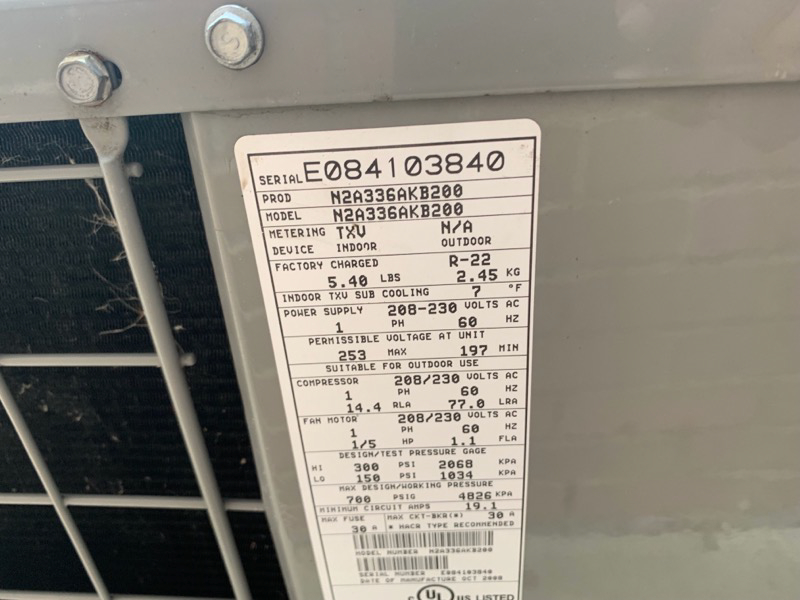
- Outdoor Unit (Air Conditioner or Heat Pump): Look on the unit's exterior cabinet, usually on a rating plate or sticker affixed to the side.
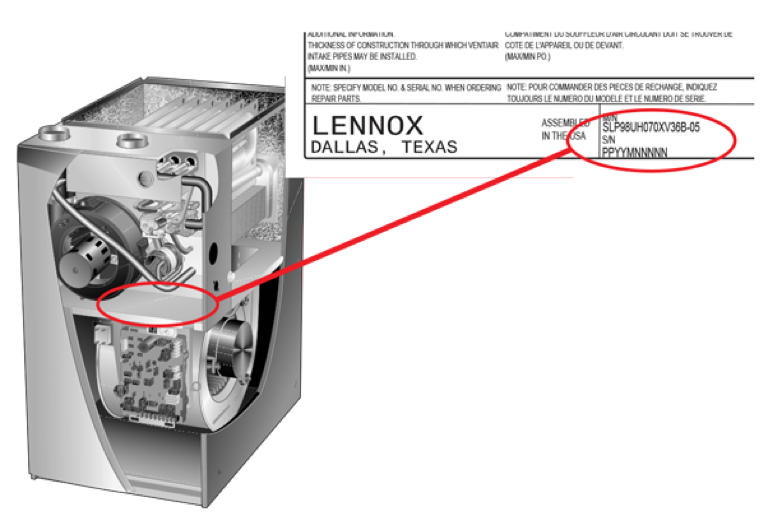
- Indoor Unit (Furnace or Air Handler): The serial number is typically located inside the unit, often on a panel that you might need to partially remove (always disconnect power before attempting to access the inside of the unit). Look for a rating plate or sticker. It might be on the blower compartment door or nearby.
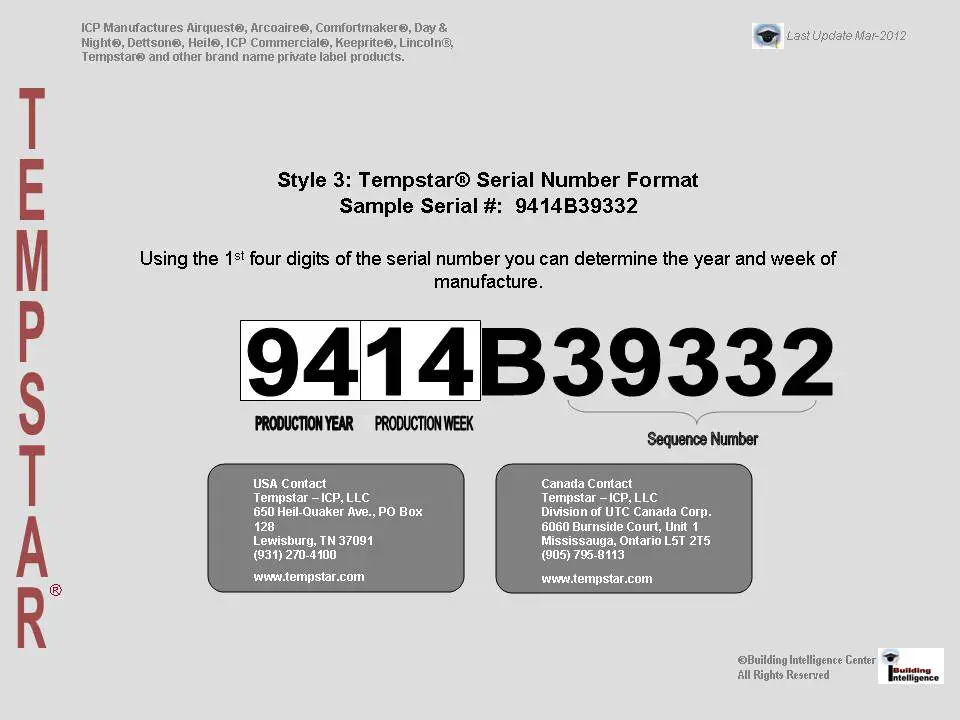
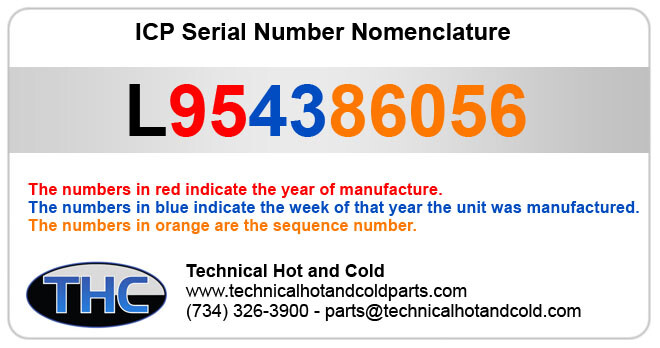
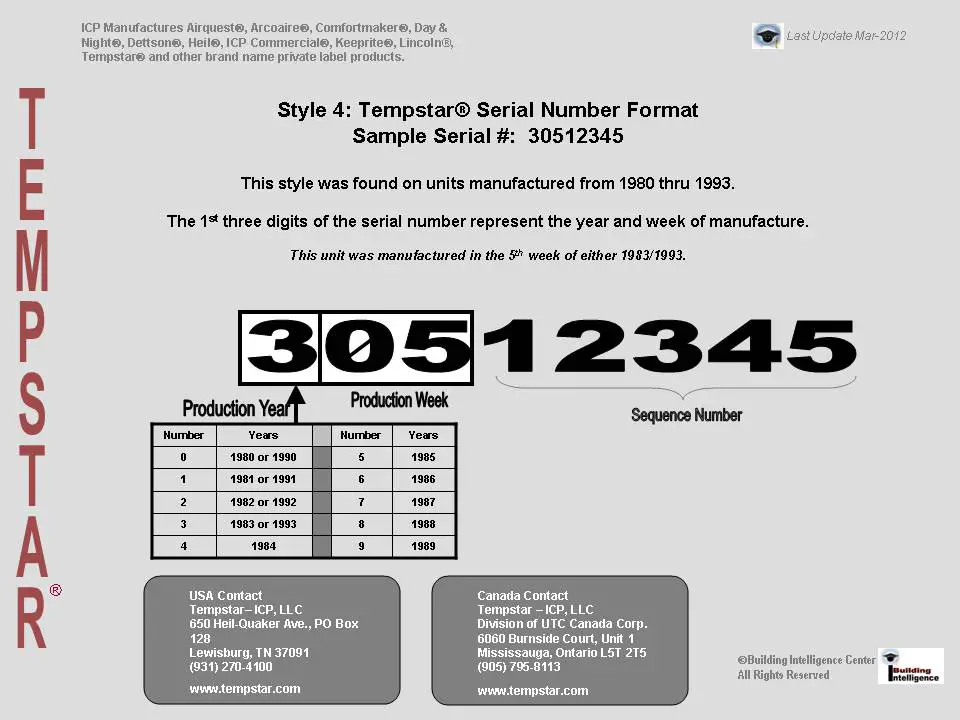
- Specific Label Information: The label will typically include the model number and the serial number. The serial number is usually a string of letters and numbers. Make sure you record it accurately.
Important: If you are uncomfortable locating the serial number yourself, contact a qualified HVAC technician. They can quickly and safely locate it for you.
Question 2: How do I use the serial number to look up my Tempstar warranty?
Tempstar does not typically offer a direct, public-facing online serial number lookup tool. Instead, the serial number is primarily used by your installing contractor and Tempstar dealers for warranty registration and claims.
Here's how to typically access your warranty information:
- Contact Your Installing Contractor: This is the best first step. They should have registered your system with Tempstar and have a record of your warranty information. They can provide you with the details, including the warranty expiration date and coverage.
- Check Your Paperwork: After installation, you should have received documentation, including the warranty registration card or certificate. Look through your records for this document. It should contain information about your warranty.
- Contact a Tempstar Dealer: If you can't reach your original contractor, contact a local Tempstar dealer. They can use the serial number to access your warranty information in Tempstar's system. Be prepared to provide proof of purchase, such as an invoice, to verify ownership. You can find authorized Tempstar dealers on the Tempstar website.
- Online Registration (If Applicable): While not a direct lookup, some installers register the system on behalf of the homeowner. In this case, the homeowner might receive an email confirmation with details about the warranty and a link to access the account (if created). Check your email, including your spam folder, for any correspondence from Tempstar or your installing contractor regarding warranty registration.
Note: Be prepared to provide the model number, serial number, installation date, and your contact information when contacting your contractor or a dealer.
Question 3: What information will I find when I look up my Tempstar warranty?
Looking up your warranty using the serial number will typically reveal the following key details:
- Warranty Start Date: This is usually the date of installation, but it's important to confirm.
- Warranty End Date: This is the date your warranty coverage expires.
- Warranty Coverage Details: This specifies which parts of the unit are covered and for how long. Standard warranties often cover parts for a specific period (e.g., 5 or 10 years), while some components, like the compressor, may have extended coverage.
- Coverage Limitations: These outline any limitations or exclusions to the warranty. For example, labor costs are often not covered under the standard warranty. Improper installation or lack of maintenance can also void the warranty.
- Registration Status: The lookup should confirm whether the system was properly registered with Tempstar. Proper registration is usually required for the warranty to be valid.
Important: Pay close attention to the specific terms and conditions of your warranty. Understanding the coverage details and limitations will help you avoid unexpected costs if a problem arises.
Question 4: What are the different types of warranties offered by Tempstar?
Tempstar offers several types of warranties, each providing different levels of coverage. Understanding these differences is essential:
- Base Limited Warranty: This is the standard warranty that comes with most Tempstar units. It typically covers parts for a specific period (e.g., 5 or 10 years). Labor costs are usually *not* included. The duration of the base warranty can vary depending on the model.
- Registered Limited Warranty: When the unit is properly registered within a specified timeframe (typically 60-90 days after installation), the parts warranty is often extended. For example, a 5-year base warranty might be extended to a 10-year warranty upon registration. Registration is usually the *responsibility* of the installing contractor, but it is always best for the homeowner to confirm.
- Extended Warranty Options: Tempstar may offer extended warranty options that provide additional coverage beyond the standard warranty. These extended warranties may cover labor costs, provide longer parts coverage, or include other benefits. These are often available for purchase separately and must be done within a certain timeframe.
- Compressor Warranty: The compressor, a critical component of air conditioners and heat pumps, often has a longer warranty period than other parts. It's crucial to understand the specific terms of the compressor warranty.
Note: Always ask your contractor about the warranty options available for your Tempstar unit and the benefits of each option. Make sure to get all warranty information *in writing*.
Question 5: What voids my Tempstar warranty?
Several factors can void your Tempstar warranty. Understanding these can help you maintain your warranty coverage:
- Improper Installation: The system must be installed by a qualified and licensed HVAC contractor according to Tempstar's specifications and local codes. Improper installation is a common cause of warranty voidance.
- Lack of Maintenance: Regular maintenance, such as cleaning coils and changing filters, is essential for keeping your system running efficiently and preventing problems. Failure to perform routine maintenance can void the warranty. Keep records of all maintenance performed.
- Unauthorized Repairs or Modifications: Repairs or modifications performed by someone other than a qualified and licensed HVAC technician, or using non-approved parts, can void the warranty.
- Misuse or Abuse: Operating the system in a way that it was not designed for, such as running the air conditioner with windows open, can void the warranty.
- Failure to Register: In many cases, the warranty must be registered with Tempstar within a specific timeframe after installation. Failure to register the system can result in a shorter warranty period or even void the warranty altogether.
- Acts of God: Damage caused by natural disasters, such as floods, fires, or lightning strikes, is typically not covered under the warranty.
Important: It's crucial to follow the manufacturer's recommendations for maintenance and operation to protect your warranty. Keep detailed records of all service and repairs performed on your system.
Question 6: What if I can't find my serial number or warranty information?
If you've exhausted all avenues and still can't find your serial number or warranty information, here's what you can do:
- Check Original Paperwork Thoroughly: Double-check all paperwork related to the purchase and installation of your HVAC system. The serial number and warranty information may be buried within these documents.
- Contact the Previous Homeowner (If Applicable): If you recently purchased the home, try contacting the previous homeowner. They may have records of the HVAC system's serial number and warranty information.
- Contact Your Real Estate Agent (If Applicable): Your real estate agent may have access to documents related to the home's systems, including the HVAC system.
- Contact Tempstar Directly: As a last resort, you can try contacting Tempstar directly. While they may not be able to look up your warranty without the serial number, they may be able to provide guidance or suggest other resources. Have as much information as possible readily available, such as the approximate installation date, model number, and the name of the installing contractor (if known).
- Consider a Professional HVAC Inspection: A professional HVAC technician can inspect your system, identify the model and potentially estimate the installation date based on the unit's features. This might help narrow down the search for warranty information.
Remember: Maintaining detailed records of your HVAC system's purchase, installation, and maintenance is essential for protecting your investment and ensuring access to warranty coverage.
Question 7: How does transferring ownership of my home affect my Tempstar warranty?
The transferability of your Tempstar warranty depends on the specific terms and conditions of your warranty. Generally, most Tempstar warranties are transferable, but there are often requirements and limitations.
- Check the Warranty Documents: The first step is to carefully review your warranty documents. Look for specific clauses regarding transferability. These clauses will outline any requirements for transferring the warranty to a new homeowner.
- Notification Requirements: Many warranties require you to notify Tempstar or the installing contractor of the ownership transfer within a certain timeframe (e.g., 30 or 60 days) after the sale of the home.
- Transfer Fees: Some warranties may require a transfer fee to be paid to Tempstar to officially transfer the warranty to the new homeowner.
- Registration by the New Homeowner: In some cases, the new homeowner may need to register the system with Tempstar to activate the warranty under their name.
- Professional Installation Requirement: The original installation must have been performed by a licensed professional for the warranty to remain valid for the subsequent owner.
- Maintaining Service Records: Keep detailed service records throughout the lifespan of the unit to ensure the warranty is valid for the future owner.
Important: Failure to comply with the transfer requirements outlined in the warranty documents may result in the warranty becoming void for the new homeowner. Contact your installing contractor or Tempstar directly for clarification on the transfer process.