What Is Central Air Conditioning System
Imagine this: It's a sweltering summer day, you walk into your home, expecting that cool, refreshing blast of air from your central air conditioning system. But instead, you're met with… well, nothing. Or perhaps a weak, tepid breeze. A malfunctioning central AC unit is a common household headache, but before you panic and call for expensive professional help, there are a few basic troubleshooting steps you can take yourself. This guide will walk you through them, empowering you to diagnose and potentially fix the issue while emphasizing safety and knowing when to call in the experts.
Understanding Your Central Air Conditioning System
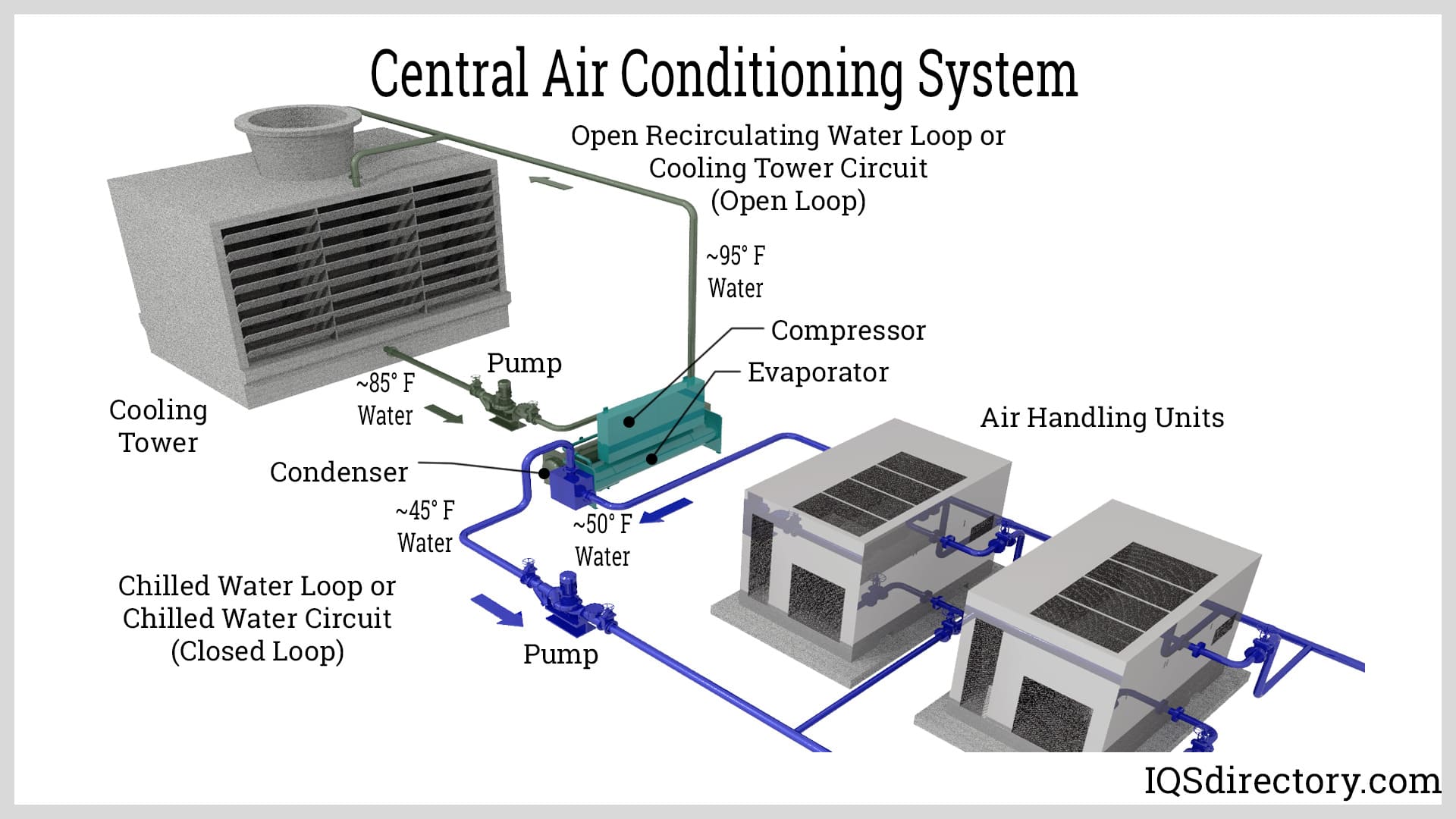
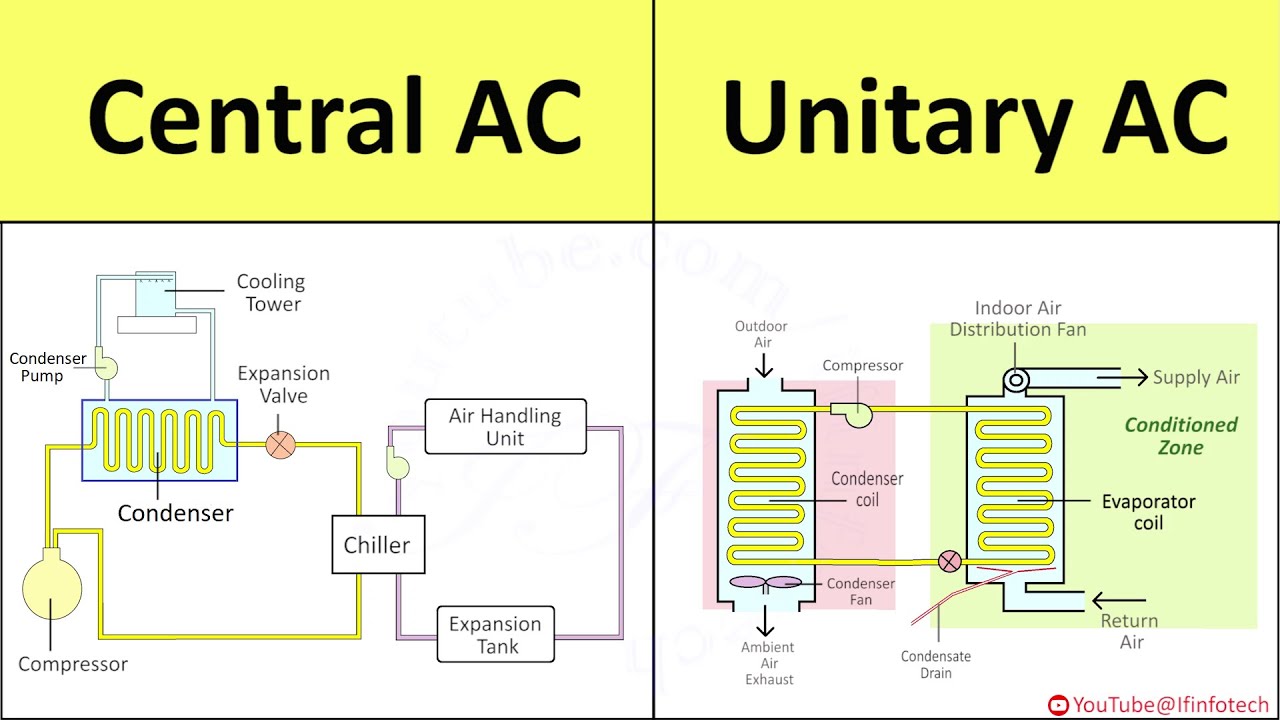
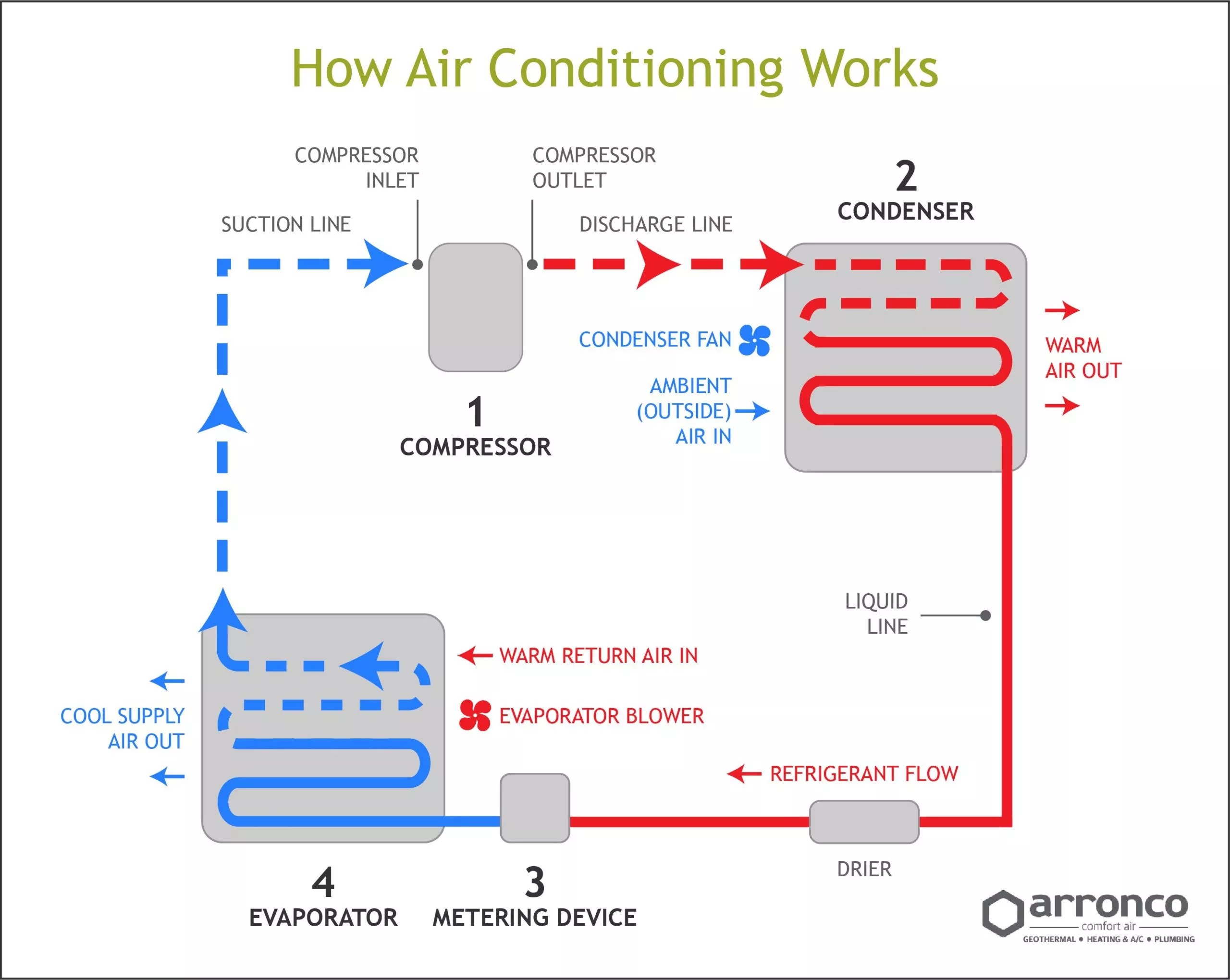
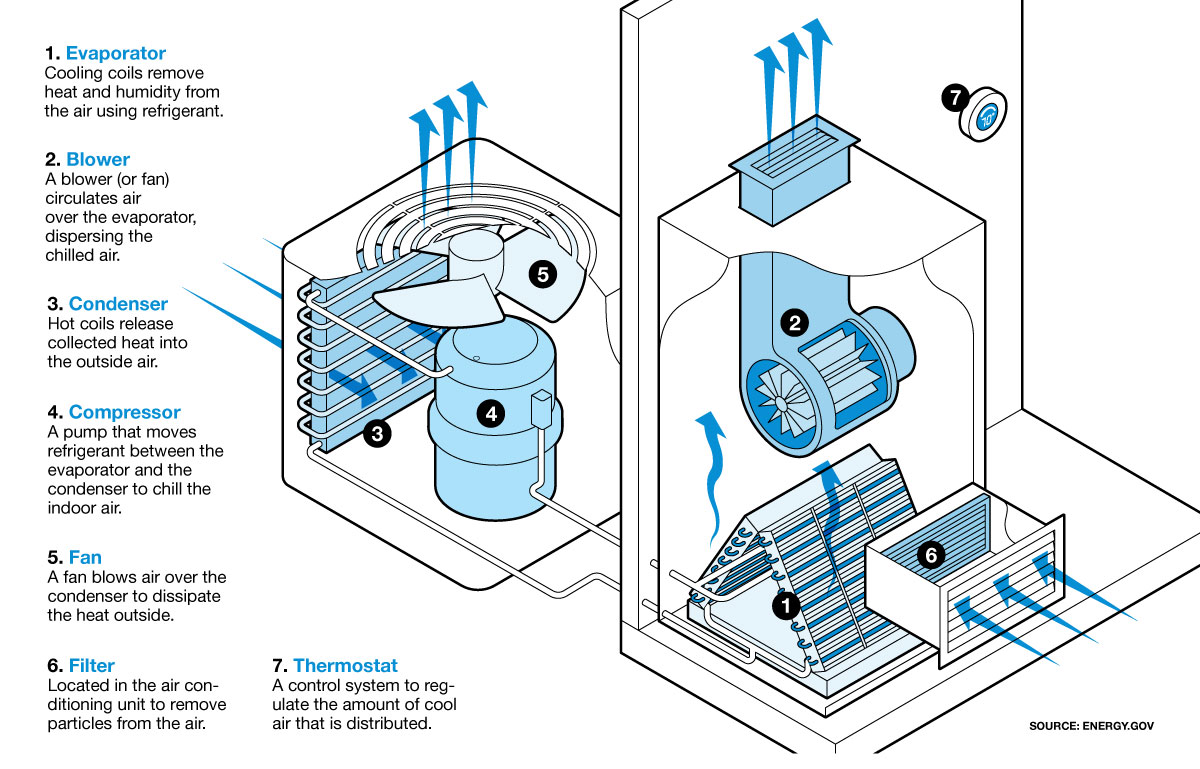
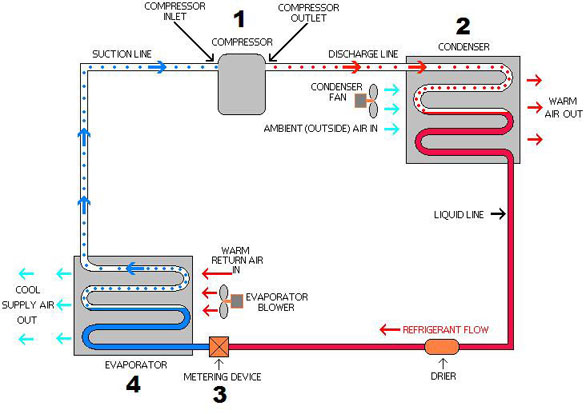
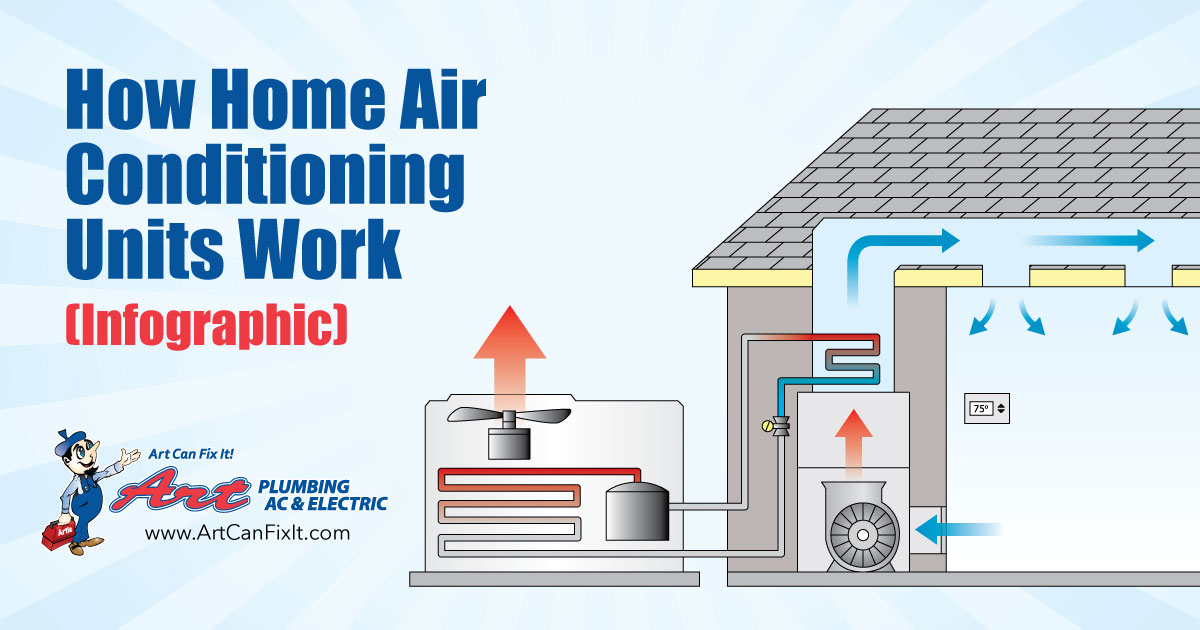
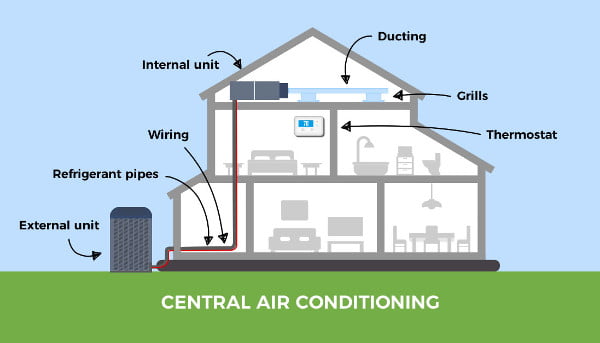
First, let's break down what a central AC system *is*. It's not just one box; it's a system with several key components working together:
- The Condenser Unit: Located *outside* your house, this unit contains the compressor, condenser coil, and fan. It's responsible for releasing heat from the refrigerant.
- The Evaporator Coil: Located *inside* your house, usually inside or near your furnace or air handler, this coil absorbs heat from the air.
- The Air Handler (Furnace): This distributes the cooled air throughout your home via ductwork. It contains a blower fan.
- Refrigerant Lines: These copper lines carry refrigerant between the condenser and evaporator coils.
- Thermostat: This is your control panel, allowing you to set the desired temperature and control the system.
Step-by-Step Troubleshooting Guide
Step 1: Check the Thermostat
This might seem obvious, but it's the most common culprit! Ensure your thermostat is set correctly:
- Power: Make sure the thermostat has power. Check the batteries if it's a battery-powered model. If it's hardwired, check your circuit breaker.
- Mode: Ensure the thermostat is set to "Cool" and not "Heat" or "Off".
- Temperature: Make sure the set temperature is lower than the current room temperature. A few degrees lower is usually sufficient.
- Fan Setting: Try setting the fan to "Auto" instead of "On." In "On" mode, the fan runs continuously, even when the AC isn't actively cooling. If it's set to "Auto," the fan will only run when the unit is cooling.
DIY Fix: Replace the thermostat batteries if needed. If the thermostat is hardwired and not working, check the circuit breaker. If the problem persists, consider replacing the thermostat. New digital thermostats are relatively inexpensive and easy to install (but always turn off the power at the breaker before working with electrical components!).
Step 2: Check the Circuit Breaker
An overloaded circuit can trip the breaker, cutting power to your AC unit. Check your electrical panel for tripped breakers.
- Locate the Breaker: Identify the breaker labeled "AC," "Air Conditioner," or similar. If you're unsure, you may need to test each breaker.
- Check the Position: A tripped breaker will usually be in the "Off" or "Middle" position.
- Reset the Breaker: First, turn the breaker completely to the "Off" position. Then, turn it to the "On" position.
Important Safety Note: If the breaker trips *immediately* after resetting it, or trips frequently, do not continue to reset it. This indicates a more serious electrical problem, and you should call a qualified electrician immediately. Repeatedly resetting a breaker can be a fire hazard.
Step 3: Inspect the Outdoor Condenser Unit
The outdoor unit is vulnerable to debris and blockages. A clogged unit can significantly reduce its efficiency and even cause it to overheat.
- Power Off: Before inspecting or cleaning the outdoor unit, turn off the power to the unit at the disconnect box located near the unit itself. This is typically a small gray box with a handle or switch. Also, turn the breaker off too.
- Clear Debris: Remove any leaves, branches, grass clippings, or other debris from around the unit. Pay particular attention to the fins on the sides of the unit. These fins help dissipate heat, and if they are blocked, the unit won't cool properly.
- Clean the Fins: Use a garden hose with a gentle spray nozzle to clean the fins. Spray from the inside out to help flush out any dirt or debris trapped within. Do not use a pressure washer, as this can damage the delicate fins. You can also use a fin comb (available at most hardware stores) to gently straighten any bent fins.
DIY Fix: Clearing debris and gently cleaning the fins can often resolve cooling issues. Ensure there's adequate clearance (at least 2-3 feet) around the unit for proper airflow.
Step 4: Check the Air Filter
A dirty air filter is one of the most common causes of AC problems. A clogged filter restricts airflow, making the system work harder and less efficiently. This can lead to overheating, reduced cooling capacity, and even damage to the system's components.
- Locate the Filter: The air filter is usually located inside the air handler (furnace) or in a return air vent. The location varies depending on the system setup.
- Inspect the Filter: Remove the filter and hold it up to the light. If you can't see light easily through the filter, it's likely dirty and needs to be replaced.
DIY Fix: Replace the air filter with a new one of the same size and type. Check your owner's manual for the correct filter size. Aim to change your filter every 1-3 months, or more frequently if you have pets or allergies.
Step 5: Inspect the Condensate Drain Line
Your AC system removes moisture from the air, which collects as condensate. This water needs to drain properly. A clogged drain line can cause water to back up, potentially damaging your system and leading to mold growth.
- Locate the Drain Line: The condensate drain line is usually a PVC pipe that runs from the indoor unit (air handler). It typically drains outside or into a floor drain.
- Check for Clogs: Look for any signs of blockage in the drain line, such as standing water or visible debris.
DIY Fix: You can try clearing a clogged drain line using a wet/dry vacuum. Attach the vacuum hose to the end of the drain line and try to suck out any blockage. You can also try flushing the drain line with a mixture of hot water and vinegar. If the clog is stubborn, you may need to use a drain snake to break it up.
Note: Some systems have a safety shut-off switch that will turn off the AC if the drain line is clogged. Clearing the clog will allow the system to restart.
Step 6: Listen for Unusual Noises
Pay attention to any unusual noises coming from your AC unit. Banging, rattling, hissing, or screeching sounds can indicate underlying problems.
- Banging: Could indicate a loose part or a problem with the compressor (call a professional).
- Rattling: Could be caused by loose debris or a malfunctioning fan blade (check for obvious obstructions, then call a professional if the noise persists).
- Hissing: Could indicate a refrigerant leak (call a professional immediately). Refrigerant leaks are harmful to the environment and can be dangerous to your health.
- Screeching: Could indicate a problem with the motor bearings (call a professional).
Important Safety Note: If you hear any unusual noises, especially hissing, turn off the AC unit immediately and call a qualified HVAC technician. Do not attempt to diagnose or repair the unit yourself, as this could be dangerous.
When to Call a Professional
While some AC issues can be resolved with simple DIY fixes, others require the expertise of a qualified HVAC technician. Here are some situations where you should call a professional:
- Refrigerant Leaks: Refrigerant handling requires specialized equipment and training. Never attempt to repair a refrigerant leak yourself.
- Compressor Problems: The compressor is the heart of your AC system, and repairs are complex and often require replacement.
- Electrical Issues: Any electrical work beyond checking and resetting breakers should be left to a qualified electrician.
- Major Component Failure: If a major component, such as the motor, fan, or coil, has failed, it's best to call a professional for replacement.
- You've Tried Everything Else: If you've followed all the troubleshooting steps above and your AC is still not working, it's time to call in the experts.
Safety First!
Always prioritize safety when working on your AC system.
- Turn off the power at the breaker and disconnect box before inspecting or cleaning the outdoor unit.
- Never work on electrical components with the power on.
- Do not attempt to handle refrigerant, as it can cause frostbite and other health problems.
- If you're unsure about anything, call a qualified professional.
Preventative Maintenance
The best way to avoid AC problems is to perform regular preventative maintenance. Here are some tips:
- Change your air filter regularly (every 1-3 months).
- Clean the outdoor unit annually (usually in the spring before the cooling season).
- Trim vegetation around the outdoor unit to ensure proper airflow.
- Schedule an annual maintenance check with a qualified HVAC technician. They can inspect the system, clean the coils, check refrigerant levels, and identify any potential problems before they become major issues.
By following these troubleshooting steps and preventative maintenance tips, you can keep your central air conditioning system running smoothly and efficiently for years to come, saving you money and keeping you comfortable all summer long.

:max_bytes(150000):strip_icc()/what-are-central-air-conditioners-1152645_V2-390c6f1f6ca14b4ebc59426f226a78a8.png)